 Receive data from another app
The Receive data from another app step lets another app start your automation and hand it data. The app sends a POST request to the axiom.ai API, from an integration such as Zapier, Make or n8n, or from a service such as Postman, Power Automate or Google Apps Script. The data in the request becomes the [webhook-data] token for the rest of the automation to use.
You can use this step to:
- Trigger an automation from another app through the API
- Pass data into an automation with a POST request
A subscription that includes Webhooks is required; see pricing for details.
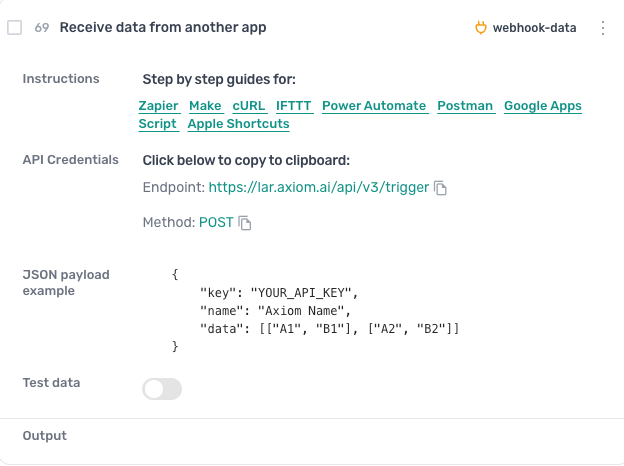
How to configure the Receive data from another app step
Instructions
Links to the step by step guides for each app: Zapier, Make, cURL, IFTTT, Power Automate, Postman, Google Apps Script and Apple Shortcuts.
API credentials
The endpoint, https://lar.axiom.ai/api/v3/trigger, and the method, POST. Click either to copy it for the app that sends the request.
JSON payload example
The body the request has to carry: key is your API key, name is the automation's exact name, and data is optional, the rows to pass in, each a list of cells. For the full format, see pass input data.
Test data
Turn the switch on and enter mock data to run the automation by hand before the other app is set up, in the same shape as data:
[["A1", "B1", "C1"], ["A2", "B2", "C2"]]
When you click Run in the Builder, this data is used in place of data received through the API.
Further reading
- API documentation
- Guides: Postman, Google Apps Script, Zapier, Power Automate, and all guides
Guides that use this step
How to use cURL to trigger an axiom.ai automation
CodeLearn how to use cURL to trigger your automation. This allows for your automations to be triggered using the command line.
Send and receive webhooks in a browser automation
- Start when another app sends me data by webhook
- Open the page in each row and get its title
- Post the results to my app's webhook URL
Trigger a web scraper from a webhook
- Take a list of product URLs sent to me by webhook
- Open each one and scrape the title and price
- Post everything scraped to my results webhook
Trigger a browser automation from Langflow
- Take a list of URLs sent to me by Langflow
- Open each one and scrape the title and price
- Add everything scraped to my Google Sheet
Trigger an automation from a GitHub webhook
- Start when GitHub sends a webhook for my repo
- Take the event details GitHub sends
- Log each event as a new row in Airtable
Trigger an automation from Google Apps Script with sheet data
- Take the rows my Apps Script sends me
- Open Google search
- Type the text from column A into the search