Make
Make is a workflow builder you can connect to axiom.ai in either direction. Trigger a Make scenario when an axiom.ai automation runs, or trigger an automation from any Make scenario.
Trigger a Make scenario from an axiom.ai automation
Use the Trigger webhook step to start a Make scenario when your automation runs. You'll need a Make account.
In Make:
- Click Create new scenario.
- Add a trigger and search for Webhooks, then choose Custom webhook.
- Click Create a webhook, enter a name, and click Save.
- Copy the webhook URL Make gives you. It starts with
https://hook.... Save it for the next section. - Optionally, edit the advanced settings to define a data structure.
- Build out the rest of your scenario with the modules you need.
In axiom.ai:
- Open your automation and add a Trigger webhook step.
- Set
Endpointto the webhook URL you copied from Make. - Set
Payloadto the data you want to send.
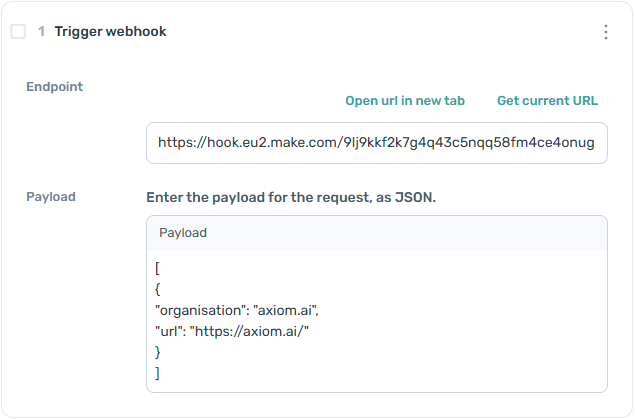
For Make's side of the setup, see Make's receiving a webhook docs.
Trigger an axiom.ai automation from a Make scenario
Note: This setup uses the axiom.ai webhook API. A subscription that includes Webhooks is required to use the Receive data from another app step. See pricing for details.
Note: We're aware of an issue with the official Make integration that can prevent new users from adding connections. Use the HTTP request setup below in the meantime.
You'll need:
- API key. Find it on the API key dashboard.
- Automation name. The exact name of the automation you want to trigger.
- Endpoint.
https://lar.axiom.ai/api/v3/trigger.
In Make:
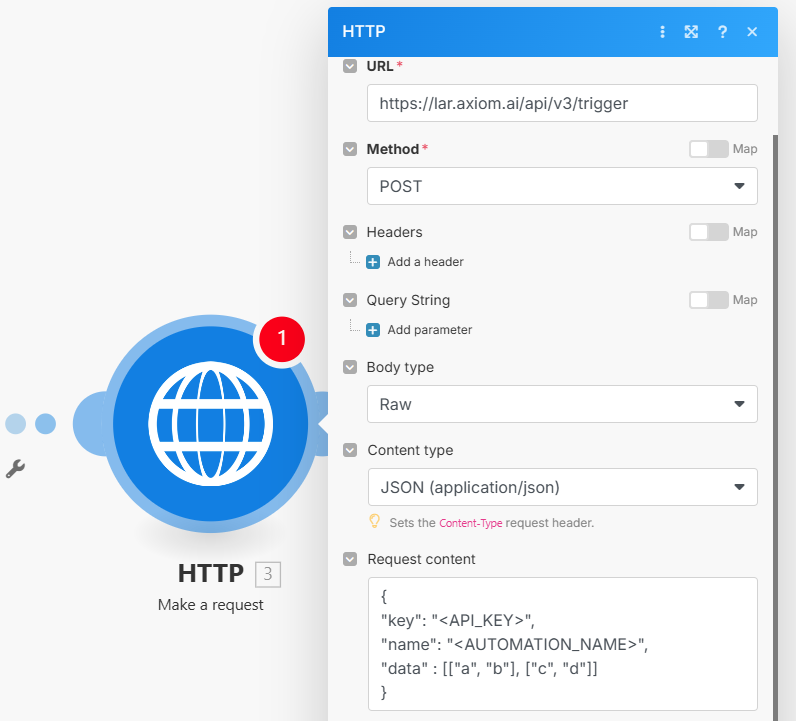
- Add a new module to your scenario. Search for HTTP and add Make a request.
- Set
URLto the axiom.ai endpoint above. - Set
Methodto POST. - Set
Body typeto Raw. - Set
Content typeto JSON (application/json). - Add the JSON body in
Request content. See sending data with the API for the format.
In axiom.ai:
- Add a Receive data from another app step at the start of your automation.
When the run is successful, axiom.ai returns a JSON response Make can use in later modules. See understanding the API response for the format.
Test the integration
To test the axiom.ai → Make direction, click Run in the axiom.ai extension, wait a few seconds, then check History in Make.
To test the Make → axiom.ai direction, click Run once in Make, wait a few seconds, then check run reports in axiom.ai.
Future plans
We have an official Make integration but are aware of issues with new connections, likely related to the Integromat-to-Make migration. We hope to restore full integration support soon, which will make this setup simpler than the HTTP request workaround above.