Loop through a list of URLs
When the thing you're automating needs to happen on lots of pages, not one. You'll pass in a list of URLs, visit each one, and run the same actions on every page. Useful for product-page scraping, bulk screenshots, and any "do this 200 times" task.
What you'll build
An automation with three or four steps:
- A data source: a Google Sheet, a CSV, or a Get a list of links to pages from a URL scrape.
- Loop through data: repeats the next steps once per URL.
- Inside the loop, Go to page: opens each URL.
- Inside the loop: whatever you want to do on each page.
Build it from a description
The fastest way in: describe the task and let axiom.ai suggest the steps.
- On the What shall we automate? screen, click Build from description.
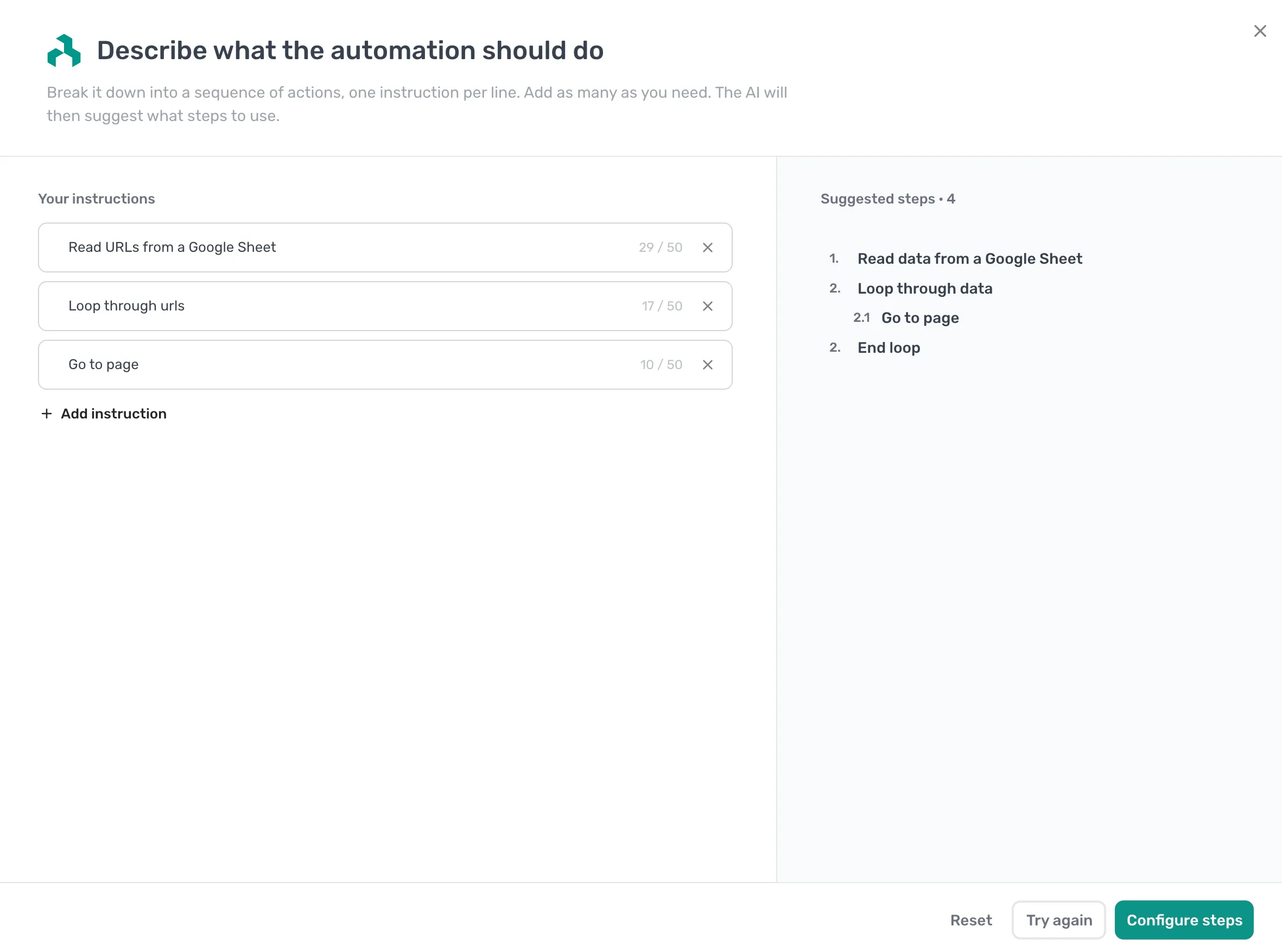
- In the Describe what the automation should do dialog, add these instructions, one per line:
- Read URLs from a Google Sheet
- Loop through urls
- Go to page
- Click Suggest steps. axiom.ai proposes Read data from a Google Sheet, then a Loop through data step with Go to page nested inside it.
- Click Configure steps to add them to the Builder.
Add more instructions for whatever should happen on each page, such as scraping or clicking, and axiom.ai will nest those steps inside the loop too. The suggestions still need wiring up: point the data step at your URLs and reference the current loop value in the Go to page step, exactly as in Build it manually below.
Build it manually
Prefer to add the steps yourself? Build the same automation one step at a time.
- Get your URLs into a step. The three usual sources:
- A Read data from a Google Sheet step pointing at a column of URLs.
- An Import CSV File step if the URLs live in a CSV.
- A Get a list of links to pages from a URL step if you want to scrape the URLs off a listing page first.
- Add a Loop through data step. Reference the URL data with Insert Data.
- Inside the loop, add a Go to page step. Insert the current loop value as the URL. This is what makes the automation visit a different page each iteration.
- Add whatever should run on each page, such as scrape, click, fill, or screenshot, below the Go to page step and still inside the loop.
- Run the automation and watch it work through the list.
The shape: get URLs, loop once per URL, go to that URL, do the work.
Things worth knowing
- The whole job of the Go to page step inside a loop is to use the current URL, not the first or last one. Always use Insert Data to reference the loop row, never paste a hard-coded URL.
- Lots of sites rate-limit or block automated traffic when hit in quick succession. A Wait step inside the loop is usually a good idea.
- If any single URL fails, the whole loop stops. Wrap the page work in a Try / Catch step if you'd rather skip bad URLs and keep going.
Next steps
- The Loop through data reference covers the loop mechanics.
- The Try / Catch reference covers handling failures mid-loop.
- Full walkthroughs with templates: browser automation guides.