Get started, build an automation from a description
The fastest way to build your first automation is to describe what you want and let axiom.ai suggest the steps. Write your task as a few plain-English instructions, and Build from description scaffolds a matching workflow that you refine in the Builder. This page covers what Build from description is, how it works, and how to use it for three common starting points: scrape a page into a Google Sheet, fill a form from a spreadsheet, or loop through a list of URLs.
What Build from description is
Build from description is an AI-assisted way to create an automation. Instead of adding every step yourself, you describe the task as a short list of instructions and axiom.ai suggests the steps to carry it out.
You stay in control. The suggestions are a starting point, not a finished automation: you drop them into the Builder and configure each step (selectors, fields, and data) before you run. Think of it as a scaffold that gets you most of the way there.
How it works
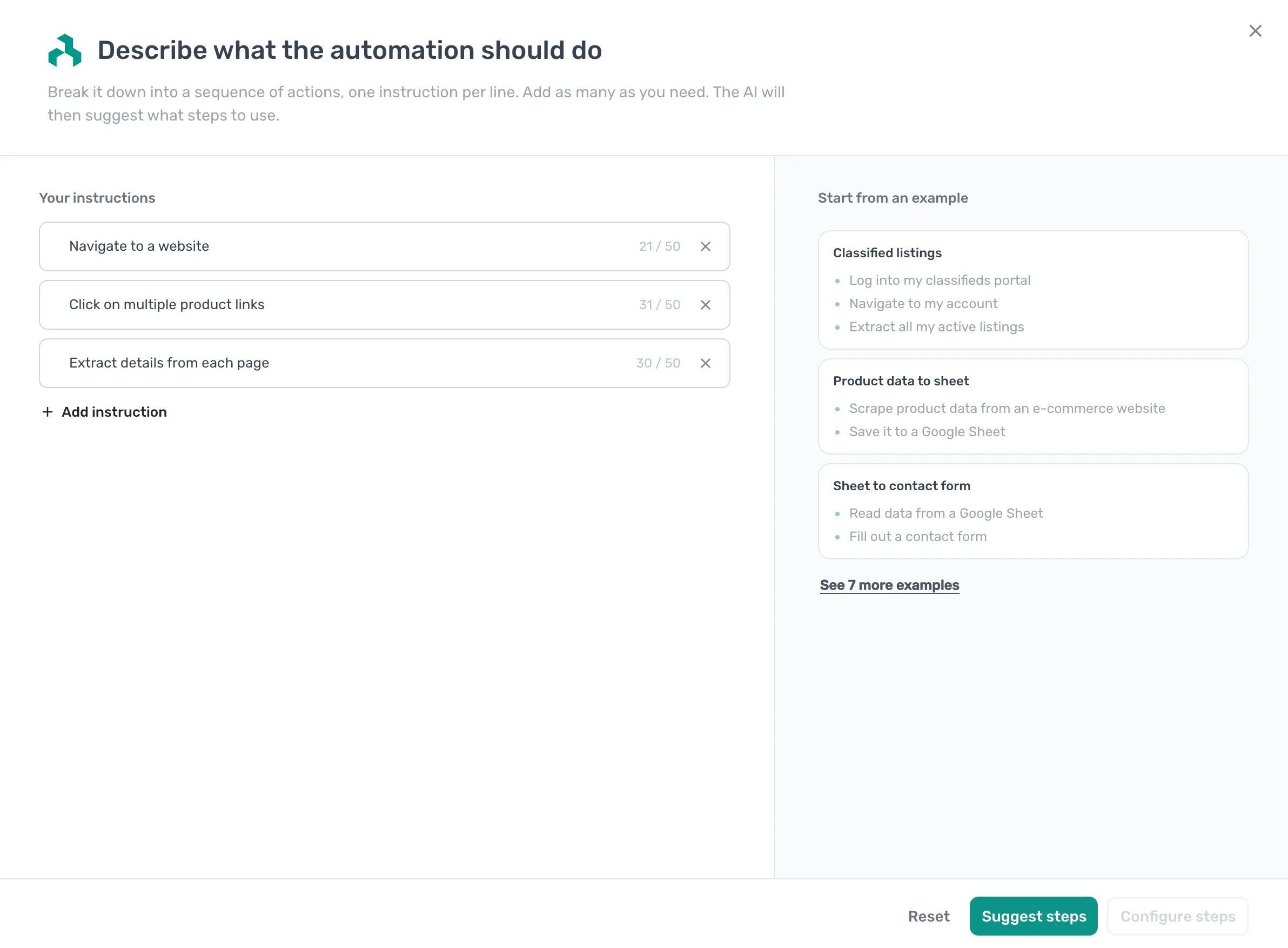
- Start a new automation. On the What shall we automate? screen, click Build from description.
- In the Describe what the automation should do dialog, add your instructions under
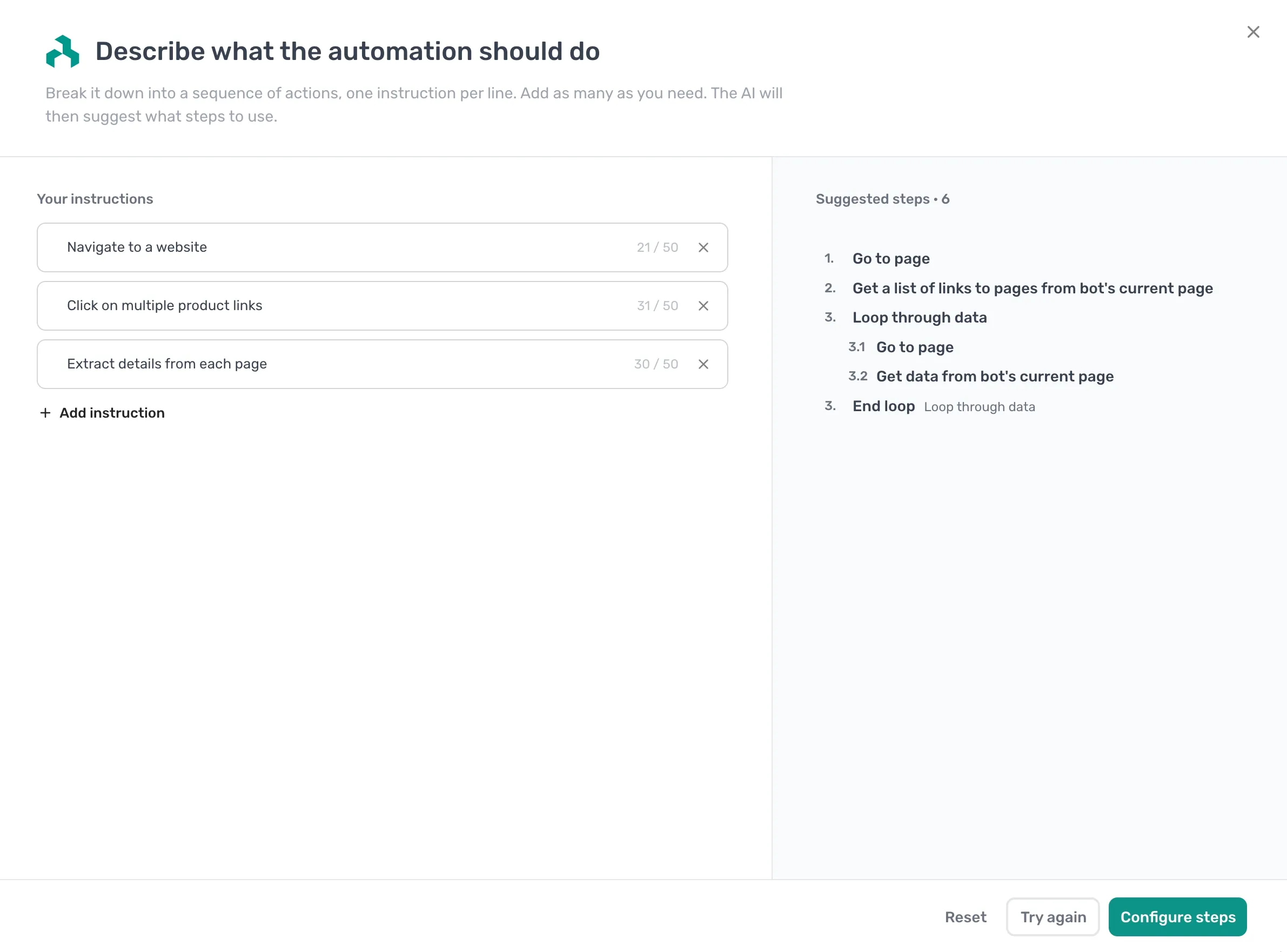
Your instructions, one action per line (up to 50 characters each). Click Add instruction to add more, or pick a ready-made set under Start from an example. - Click Suggest steps. axiom.ai reads your instructions and proposes a matching list, such as Go to page, Enter text, Click element, and Get data from bot's current page.
- Click Configure steps to add the suggestions to the Builder, then set up each step. Not quite right? Click Try again to regenerate, or Reset to clear your instructions and start over.
- Run the automation.
Note: Keep each instruction to a single action and describe the outcome you want. Shorter, sequential instructions produce a closer set of suggested steps than one long sentence.
Use it for a common starting point
Not sure what to type? Start from one of the ready-made examples in the dialog, or from one of the three walkthroughs below. Each takes about five minutes and links to the relevant reference pages when you want more depth. Here are the instructions that get each one going:
- Scrape a page into a Google Sheet: enter Scrape product data from an e-commerce website, then Save it to a Google Sheet.
- Fill a form from a spreadsheet: enter Read data from a Google Sheet, then Fill out a contact form.
- Loop through a list of URLs: enter Go to each URL in my list, then Scrape the page title.
Scrape a page into a Google Sheet
Describe the task and axiom.ai suggests the steps, or build it manually. Scrape a list or table from any page and write each row to a Google Sheet.
Fill a form from a spreadsheet
Describe the task and axiom.ai suggests the steps, or build it manually. Read rows from a spreadsheet and loop through them, filling a web form for each row.
How to automate web forms
Describe the task and axiom.ai suggests the steps, or build it manually. Read rows from a spreadsheet and fill a web form for each one, then submit.
Loop through a list of URLs
Describe the task and axiom.ai suggests the steps, or build it manually. Pass in a list of URLs, visit each one, and run the same actions on every page.
Other ways to start
Build from description is the quickest way in, but it isn't the only one. On the What shall we automate? screen you can also:
- Add steps manually: build the automation one step at a time in the Builder. Best when you know exactly what you want or need precise control over every step.
- Import an automation: bring in an automation someone shared with you, or one you exported earlier.
- Use a template: start from a ready-made automation and adjust it to your task.
Ready for a full walkthrough with a downloadable template? Browse all browser automation guides.
Need help? Contact support or ask a question in our Reddit community.