Fill a form from a spreadsheet
A good second automation, once you're comfortable with scraping. You'll read rows from a Google Sheet and, for each row, fill in a form on a website. This is where you meet the Loop through data step, the one that repeats the same work across every row of data. Get looping right here and every "do this for each row" automation after it will feel familiar.
What you'll build
An automation built around a loop:
- Read data from a Google Sheet: pulls in the rows, one per submission.
- Loop through data: the heart of the automation, it repeats the next steps once per row.
- Inside the loop, Go to page, Enter text, and Click element: fill each field and submit.
Optionally, add a final step, such as Send an email, to confirm each submission.
Build it from a description
The fastest way in: describe the task and let axiom.ai suggest the steps.
- On the What shall we automate? screen, click Build from description.
- In the Describe what the automation should do dialog, add these instructions, one per line:
- Read data from a Google Sheet
- Loop through data
- Fill out a contact form
- Click Suggest steps. axiom.ai proposes Read data from a Google Sheet, then a Loop through data step containing Go to page, Enter text, and Click element.
- Click Configure steps to add them to the Builder.
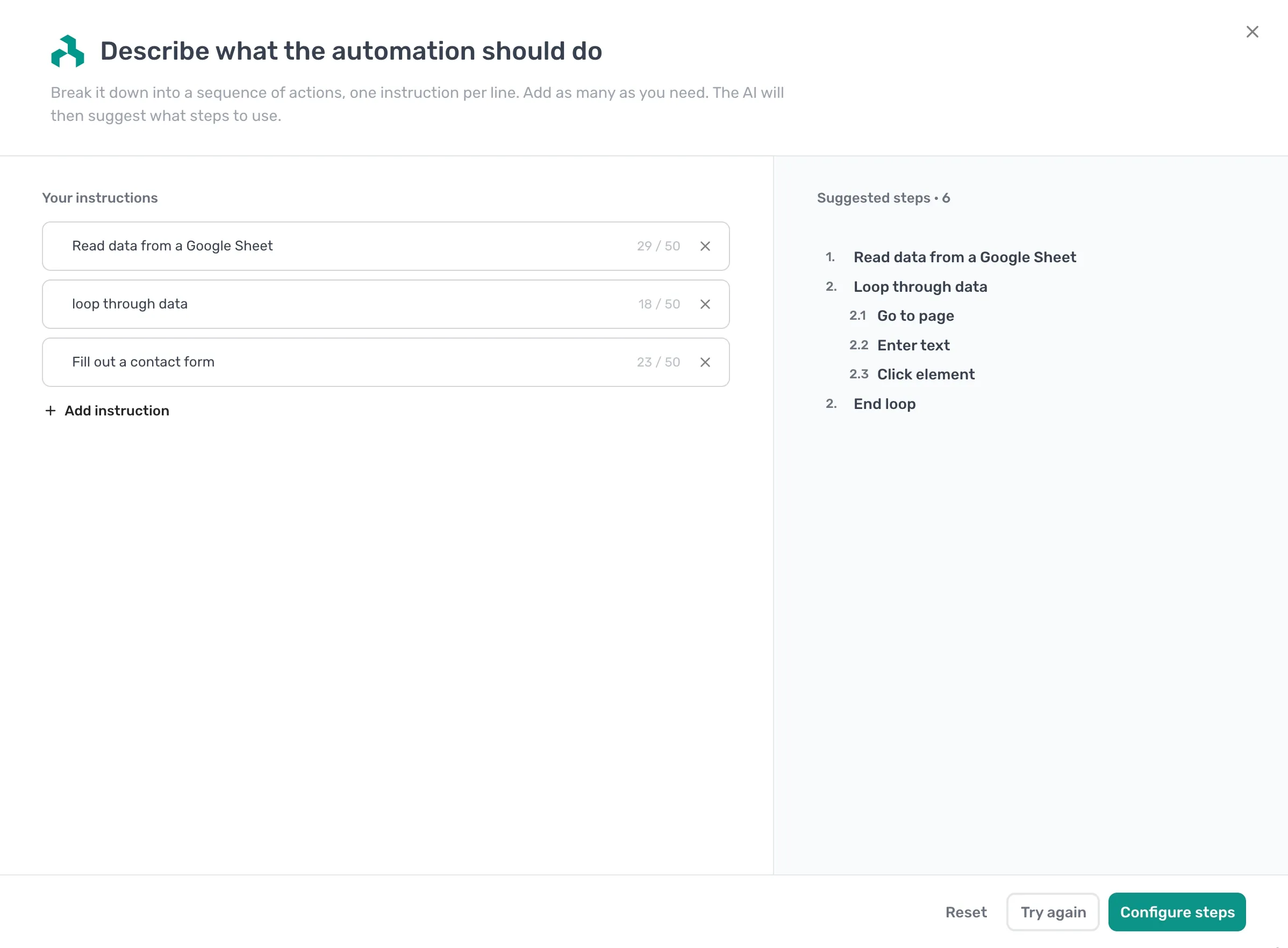
Adding Loop through data as its own instruction tells axiom.ai to wrap the form steps in a loop, so the automation repeats for every row instead of running once. The suggestions still need wiring up: point the Read data from a Google Sheet step at your sheet, and use Insert Data in each Enter text step to pull the value from the current row, exactly as in Build it manually below.
Build it manually
Prefer to add the steps yourself? Build the same automation one step at a time.
- Add a Read data from a Google Sheet step and point it at the sheet with your form data, one row per submission.
- Add a Loop through data step. Reference the sheet data with Insert Data. Every step you place inside this loop runs once per row.
- Inside the loop, add a Go to page step pointing at the form.
- Add an Enter text step for each field. Use Insert Data to pull the value from the current loop row.
- Add a Click element step for the submit button.
- Run the automation and check the submissions.
The shape: read rows, loop once per row, fill the form, submit, repeat.
Things worth knowing
- Inside the loop, the sheet data refers to the current row, not all rows. Always use Insert Data to reference the current value, never paste a hard-coded one.
- Everything you want repeated must sit inside the Loop through data step. A step placed after the loop runs only once, at the end.
- Sites often rate-limit or block automated traffic when forms are submitted in quick succession. A Wait step inside the loop is usually a good idea.
- If any single row fails, the whole loop stops. Wrap the form steps in a Try / Catch step if you'd rather skip bad rows and keep going.
- Forms with CAPTCHAs, dynamically loaded dropdowns, or multi-page wizards need extra steps. See Browser actions.
Next steps
- The Loop through data reference covers the loop mechanics.
- The Try / Catch reference covers handling failures mid-loop.
- Full walkthroughs with templates: browser automation guides.