• homeDocumentation home
No-code tool
The builder
  • Installation
  • The dashboard
  • The no-code Builder
  • Pass data between steps
  • The selector tool
  • Share an automation
  • AI Assistant
How it works
  • Interact with the browser
  • Scrape data
  • Work with data
  • Loop through data
  • Use logic
  • Log in to sites
  • Integrate AI
  • Send and receive webhooks
  • Run custom JavaScript
  • Run and schedule bots
Get started
  • Scrape a page into a Google Sheet
  • Fill a form from a spreadsheet
  • How to automate web forms
  • Loop through a list of URLs
Integrations
  • Zapier
  • Google Sheets
  • ChatGPT
  • 2Captcha
  • Puppeteer
  • Make
  • n8n
  • Microsoft Excel
  • Relay.app
  • Claude
  • Gemini
  • Sonar
  • DeepSeek
  • 1Password
Reference
  • Automation settings
  • Step index
Troubleshooting
  • Common errors
  • Debug an automation
  • Handle errors in an automation
Release notes
Code DashboardDashboardLive editorCreate scriptsRun scriptsSample scriptsRun reportsGenerate an API key
Developer hub
API
  • Orchestrate API
  • Quickstart
  • Authentication
  • Chrome API
  • Programmatic signup
  • Usage and limits
  • Step API
  • Reference
Code snippets
  • JavaScript snippets
  • Puppeteer snippets
Deep dives
  • Chromium
  • Automation JSON structure
  • Cookies in axiom.ai
  • Data handling
Troubleshooting
  • Debug developer features
  • API errors
Claude skill
  • helpGet help
  • infoFAQ
  • account_circleAccount

Build reliable browser workflows on scalable and secure system. Download the extension or go to code.axiom.ai for dev environment.


  • homeDocumentation home
No-code tool
The builder
  • Installation
  • The dashboard
  • The no-code Builder
  • Pass data between steps
  • The selector tool
  • Share an automation
  • AI Assistant
How it works
  • Interact with the browser
  • Scrape data
  • Work with data
  • Loop through data
  • Use logic
  • Log in to sites
  • Integrate AI
  • Send and receive webhooks
  • Run custom JavaScript
  • Run and schedule bots
Get started
  • Scrape a page into a Google Sheet
  • Fill a form from a spreadsheet
  • How to automate web forms
  • Loop through a list of URLs
Integrations
  • Zapier
  • Google Sheets
  • ChatGPT
  • 2Captcha
  • Puppeteer
  • Make
  • n8n
  • Microsoft Excel
  • Relay.app
  • Claude
  • Gemini
  • Sonar
  • DeepSeek
  • 1Password
Reference
  • Automation settings
  • Step index
Troubleshooting
  • Common errors
  • Debug an automation
  • Handle errors in an automation
Release notes
Code DashboardDashboardLive editorCreate scriptsRun scriptsSample scriptsRun reportsGenerate an API key
Developer hub
API
  • Orchestrate API
  • Quickstart
  • Authentication
  • Chrome API
  • Programmatic signup
  • Usage and limits
  • Step API
  • Reference
Code snippets
  • JavaScript snippets
  • Puppeteer snippets
Deep dives
  • Chromium
  • Automation JSON structure
  • Cookies in axiom.ai
  • Data handling
Troubleshooting
  • Debug developer features
  • API errors
Claude skill
  • helpGet help
  • infoFAQ
  • account_circleAccount
  1. Docs/
  2. No-Code Tool/
  3. Reference/
  4. Step index/

Read local file step

Read local file


The "Read local file" step can be used to read files from your local computer.

This step allows for reading in of text files, such as:

  • .txt, .html, .json, .csv
  • PDF
  • Microsoft Word (.docx)

Configuration


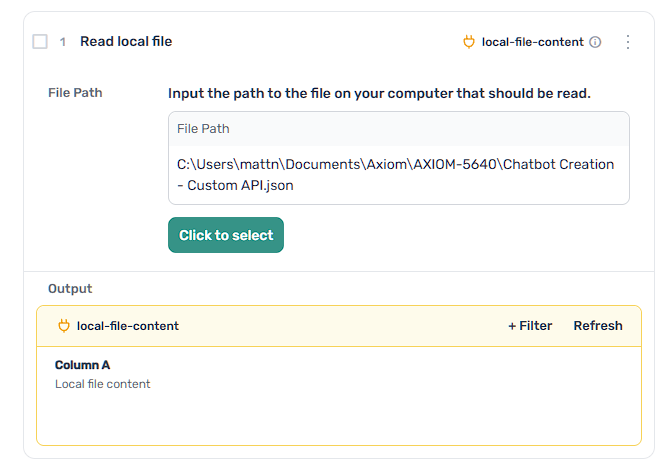
Learn how to configure the "Read local file" step.

File path

The path to the local file on your computer, this should be the full file path to the file.
Previous
Read file from Google Drive step
Next
Receive data from another app
On this page
  • Read local file
  • Configuration