Store cookies
The store cookies option saves a copy of your browser's cookies and local storage with the automation, so a run that has no browser session of its own can still be logged in. All stored cookies and local storage are encrypted and have an expiry, so you'll need to resync periodically.
Tip: When stored cookies are enabled, also turn on run notifications so you get notified if a run fails because a stored cookie or local storage session has expired.
Which runs need stored cookies
A run you start yourself from the extension borrows the cookies from your browser at that moment, so it needs nothing extra. Every other kind of run has no browser to borrow from, and needs this setting on if the site requires a login.
| How the run starts | Where it runs | Needs stored cookies |
|---|---|---|
| You click Run in cloud | Cloud | Yes |
| You click Run w/ desktop app | Desktop app | No, your browser's cookies are used |
| The scheduler | Cloud or desktop app | Yes |
| An API call or webhook | Cloud or desktop app | Yes |
Scheduled and API-triggered runs on the desktop app are started by the app itself, with no browser session attached, so they behave exactly like cloud runs here. Turning on Run via API on desktop or a desktop schedule does not change what cookies the run has. Only this setting does.
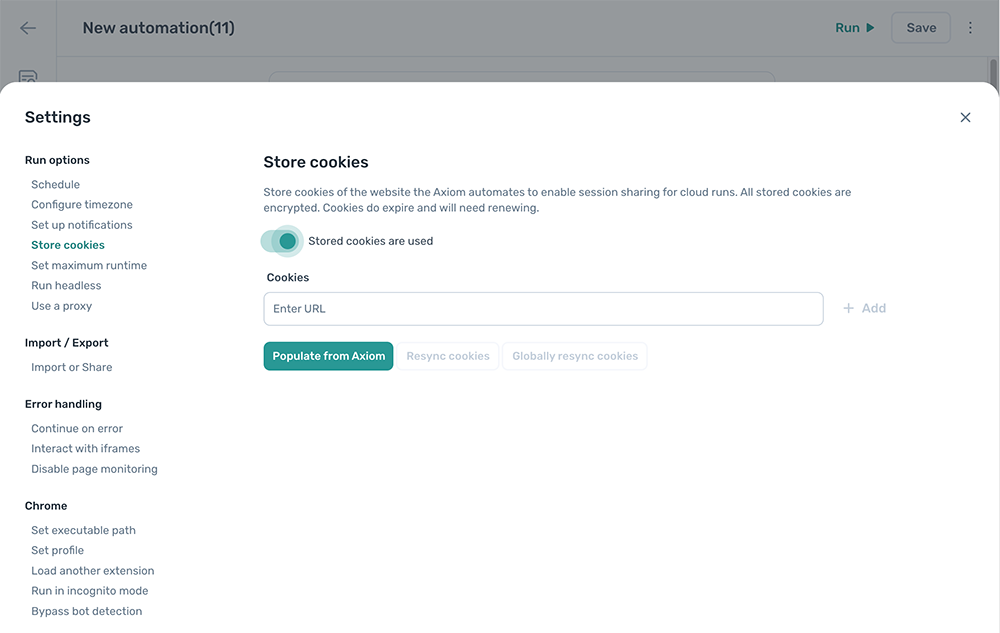
Set the toggle to Stored cookies are used to turn it on.
Tip: Stored cookies expire, so a long-running schedule needs resyncing now and then. The alternative is to log in with saved credentials: save the username and password once, and a Log in with credentials step signs in on every run, with nothing to resync.
Configure stored cookies
This setting is configured per automation.
Add a URL
Enter a URL in Cookies and click + Add to register it.
To auto-detect URLs from steps in the automation, click Populate from Axiom. Every URL referenced in a Go to page step is added to the list. URLs that aren't picked up automatically can be added manually.
Note: Some sites use a separate subdomain for sign-in (for example
login.example.com). If the sign-in subdomain isn't auto-detected, add it manually.
Resync cookies
Click Resync cookies to copy cookies from your local browser into the stored set for this automation.
Globally resync cookies
Click Globally resync cookies to copy cookies from your local browser into the stored set for this automation, plus every other automation that uses the same URLs.
URL settings
For each stored URL:
- URL. The URL the cookies are stored against. Confirm this matches the URL the automation actually loads.
- Cookies shared. On by default. Lets runs reuse the stored cookies for this URL.
- Local storage shared. Off by default. Lets runs reuse stored local storage for this URL. Only enable when cookies alone aren't enough; enabling it can slow page loads.
- Delete. Remove the stored cookies and local storage for this URL.