Store cookies
The store cookies option shares browser cookies and local storage with cloud runs, so an automation that depends on a logged-in session can reuse that session in the cloud. All stored cookies and local storage are encrypted and have an expiry, so you'll need to resync periodically.
By default, cloud runs use the cookies stored locally with the extension. Set this option to Stored cookies are used to copy cookies into axiom.ai for cloud runs.
Tip: When stored cookies are enabled, also turn on run notifications so you get notified if a run fails because a stored cookie or local storage session has expired.
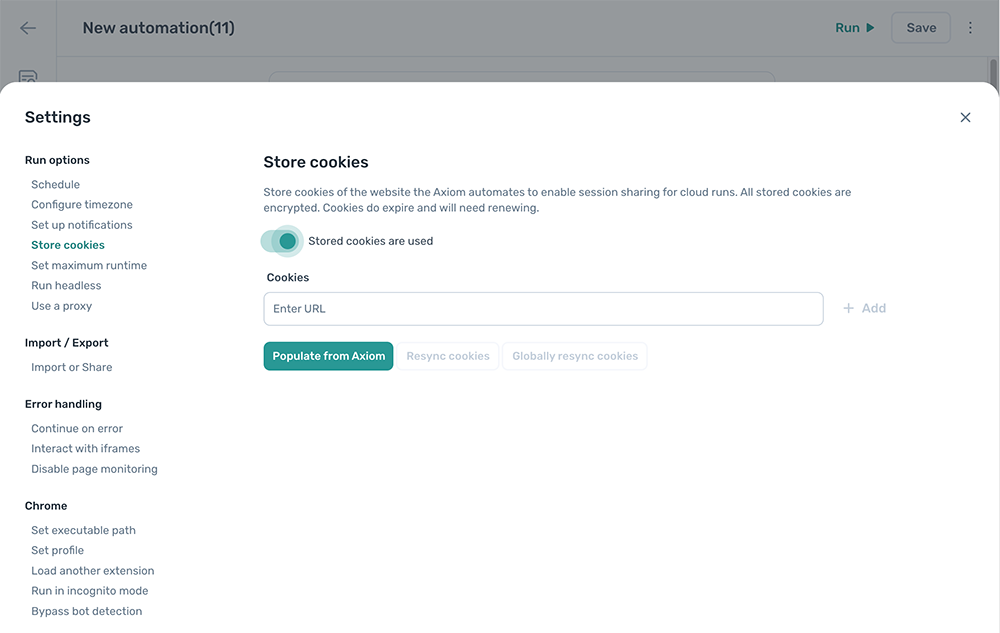
Configure stored cookies
This setting is configured per automation.
Add a URL
Enter a URL in Cookies and click + Add to register it.
To auto-detect URLs from steps in the automation, click Populate from Axiom. Every URL referenced in a Go to page step is added to the list. URLs that aren't picked up automatically can be added manually.
Note: Some sites use a separate subdomain for sign-in (for example
login.example.com). If the sign-in subdomain isn't auto-detected, add it manually.
Resync cookies
Click Resync cookies to copy cookies from your local browser into the stored set for this automation.
Globally resync cookies
Click Globally resync cookies to copy cookies from your local browser into the stored set for this automation, plus every other automation that uses the same URLs.
URL settings
For each stored URL:
- URL. The URL the cookies are stored against. Confirm this matches the URL the automation actually loads.
- Cookies shared. On by default. Lets cloud runs reuse the stored cookies for this URL.
- Local storage shared. Off by default. Lets cloud runs reuse stored local storage for this URL. Only enable when cookies alone aren't enough; enabling it can slow page loads.
- Delete. Remove the stored cookies and local storage for this URL.