 Wait step
This step allows you to add a wait to pause your bot run. You can do this to interact with the page and manually enter a password. But the most common use is to slow the bot by a fraction of a second to allow HTML elements, such as a button, to load.
A top tip when testing your automation: if you notice actions out of sync or misfiring clicks, try adding a wait. It's most likely the click fired before the button loaded.
You can use this step to:
- Pause your bot and interact with the page only on Desktop or VPS
- Wait to allow data to load
- Slow the bot to allow buttons and new elements to load
- Allow long file uploads
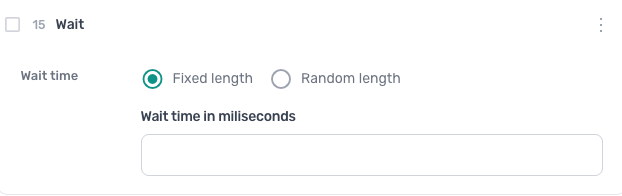
How to configure the Wait step
Wait time
Choose Fixed length and enter the wait in milliseconds. One second is 1000 milliseconds; for waits between clicks try 500.
Choose Random length to wait a different amount each time, between a minimum and maximum you set, which makes a run look less like a machine on sites that watch for regular timing.
If you want to learn more, here are some web automation tips.
Guides that use this step
Close pop-ups and dialogs during an automation
- Go to the page I give you
- Close the pop-up if one appears
- Then scrape the title and price of every item
Extract email addresses from a website into a Google Sheet
- Go to the page I give you
- Find every email address on it
- Add them to my Google Sheet, no duplicates
Scrape Amazon product data into a Google Sheet
- Open each Amazon product link in my Google Sheet
- Scrape the title, price and rating
- Add them to the Data tab of my sheet
- Delete the link row once it is scraped
How to post data to Baserow using an axiom.ai automation
CodeLearn how to automatically post to your Baserow account using an axiom.ai automation
Mark Google Sheet rows as done so a run resumes where it stopped
- Read the product URLs from my Google Sheet
- Skip any rows already marked scraped
- Open each URL and scrape the fields I need
- Write what was scraped to a Results tab
- Mark each row scraped in a new column
Automate data entry from a Google Sheet into a web form
- Read the rows from my Google Sheet
- Open the contact form on my site
- Fill in the name, email and message from each row
- Submit, then delete the row from the sheet