 Remove results that contain certain words step
Use this step to remove the rows of your data that contain particular words. It is helpful for filtering scraped data or data read from a Google Sheet. To keep only the rows that contain the words, use the Remove results which do not contain certain words step instead.
You can use this step to:
- Remove rows from a Google Sheet
- Clean data from a CSV
- Filter scraped data
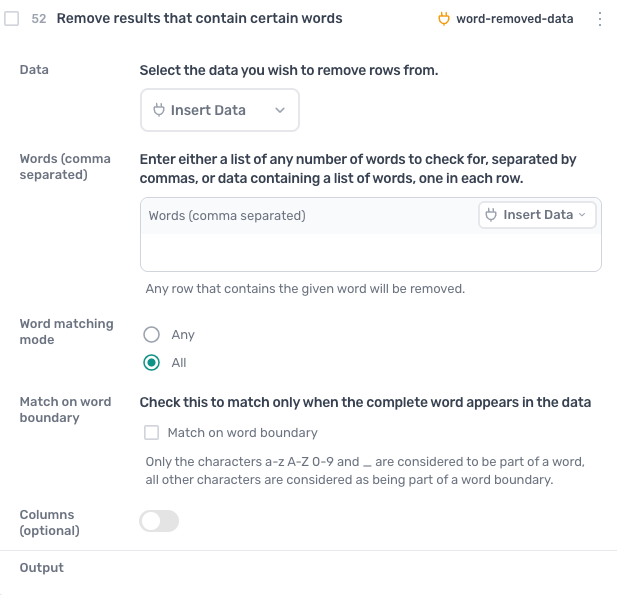
How to configure the Remove results that contain certain words step
Data
Click Insert Data and select the data to remove rows from.
Words (comma separated)
Enter a list of words separated by commas, or click Insert Data to use data holding one word per row. Any row that contains a given word is removed.
Word matching mode
Choose Any to remove a row when it contains any of the words, or All to remove it only when it contains every one. The default is All.
Match on word boundary
Tick to match whole words only: the characters a-z, A-Z, 0-9 and _ are part of a word, everything else is a word boundary.
Columns (optional)
Turn the switch on and enter column numbers separated by commas, such as 1,2, to check only those columns. A row is removed only when the match is in one of them.
The step outputs the remaining rows as the [word-removed-data] token.
Guides that use this step
Monitor a web page for new items and send a webhook
- Go to the listing page I give you
- Scrape the title and link of every item
- Keep only the ones not already in my sheet
- Add the new ones to my sheet and post my webhook
Monitor a website for changes and get an email
- Go to the listing page I give you
- Scrape the title of every item
- Keep only the ones not already in my sheet
- Add the new ones to my sheet
- Email me the new ones
Mark Google Sheet rows as done so a run resumes where it stopped
- Read the product URLs from my Google Sheet
- Skip any rows already marked scraped
- Open each URL and scrape the fields I need
- Write what was scraped to a Results tab
- Mark each row scraped in a new column