 Read data from a Google Sheet step
The Read data from a Google Sheet step is most often used to loop through a list of URLs to scrape, or to pass rows into web forms. It is the starting point of most automations. Combined with the Loop through data step, data flows from the sheet to any website or web application without code.
If you are processing thousands of rows, we recommend a design pattern called batch scraping; there is also a batch template. If you just want to scrape links, use the Get a list of links to pages step.
You can use this step to:
- Combine with the Get data from a URL step to loop through links and scrape pages
- Import data to output as a CSV
- Read data to enter into a form with the Interact with a page's interface and Enter text steps
If you have an Excel sheet, use the Read data from an Excel sheet step, or import it into Google Sheets with a couple of clicks.
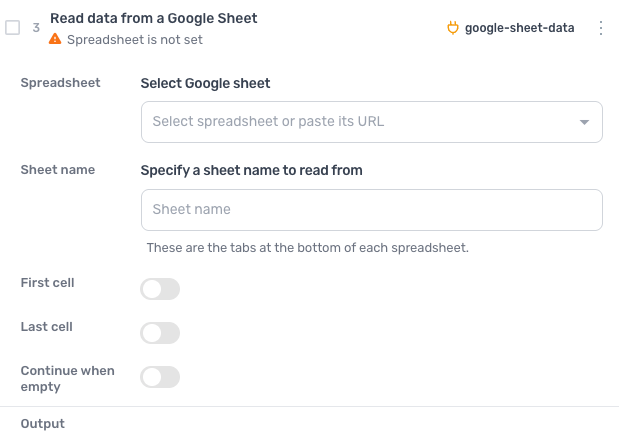
How to configure the Read data from a Google Sheet step
Spreadsheet
Select a Google Sheet, or paste its URL.
Sheet name
Optionally enter the name of the sheet to read from, the tab at the bottom of the spreadsheet. Leave it blank to use the first sheet.
First cell
Turn the switch on and enter a column and row, such as B10, to start reading from that cell: the second column on the 10th row. Off, reading starts at the first cell.
Last cell
Turn the switch on and enter a column and row, such as B100, to stop reading at that cell: the 100th row in the second column. Off, reading runs to the end of the sheet.
Continue when empty
Turn the switch on to let the automation carry on when the sheet is empty. Off, an empty sheet stops the run with an error.
The step outputs the rows as the [google-sheet-data] token.
Guides that use this step
Loop through a list of buttons with CSS selectors
- Go to the page with the list of buttons
- Read the button selectors from my sheet
- Click each of those buttons in turn
Check if a website needs a login and log in only when it does
- Go to the site I give you
- Check if it is showing a login page
- If it is, log in with my email and password
- Then carry on with the rest of the task
Scrape data from a list of URLs in a Google Sheet
- Open each link in column A of my Google Sheet
- Ask me which data to scrape from each page
- Put the details in that URL's row from column B
Screenshot a list of websites from a Google Sheet
- Open each website link in column A of my sheet
- Save a screenshot of the page to my computer
- Write today's date in column B of the same row
Extract email addresses from a website into a Google Sheet
- Go to the page I give you
- Find every email address on it
- Add them to my Google Sheet, no duplicates
Mail merge in Gmail from a Google Sheet
- Read the rows from my Mail merge sheet
- Open a new email in Gmail for each row
- Fill in the address, subject and body
- Send it and delete the row