 Switch browser tab step
This step is essential when Axiom opens a new browser tab or window during operation. Since the bot operates in only one tab at a time and cannot switch tabs automatically, you must manually direct it to the new tab. Failing to do so may result in errors like 'click element not found' because the bot remains active in the original tab. For multi-tab tasks, combine this step with the 'Close tab' step for seamless automation.
You can use this step to:
- Switch from one tab to a pop up that is a new tab
- Jump between new tabs opened during a bot run
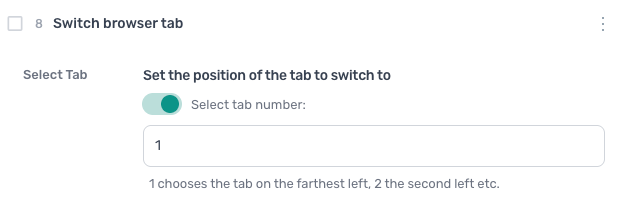
How to configure the Switch browser tab step
Select Tab
Set the position of the tab to switch to. 1 chooses the tab on the farthest left, 2 the second left etc.
Additional information
Some websites add '_blank' to their links, forcing a page to open a new tab, so keep an eye out for new tabs opening when testing your bot.