Browser agents for building bots in Chrome
Describe the workflow you want to automate to the AI agent. It builds a bot that does the task for you, whenever you run or schedule it.
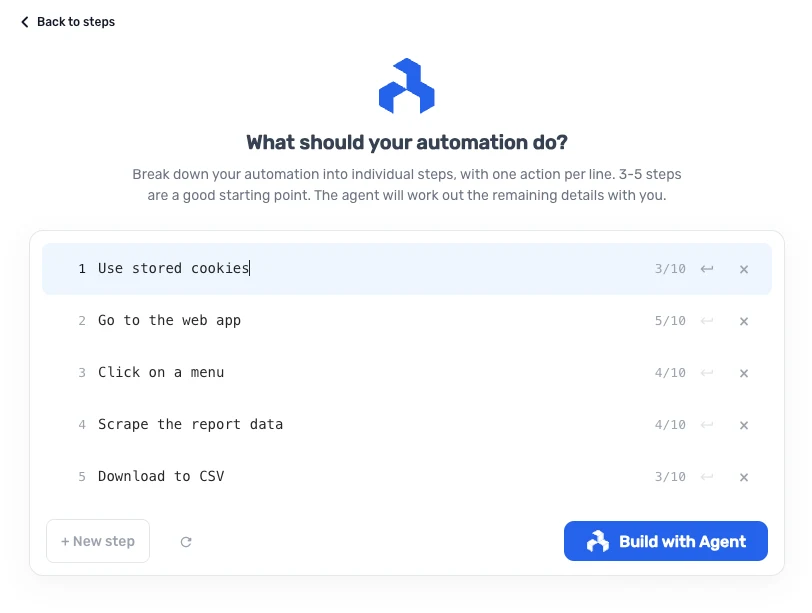
- Use stored cookies
- Go to the web app
- Click on a menu
- Scrape the report data
- Write to a Google Sheet
How it works
Say what you do in the browser.
Install axiom.ai's Chrome extension and write the workflow as a short list: the URL and the actions to replicate. Then click Build. The browser agent opens Chrome in the cloud, replicates the workflow and converts it into a bot.
1. Describe the workflow
Share the URL of the web page to automate, any data source, and describe the workflow. For your first bot keep it simple: three or four lines.
2. Answer the AI agent's questions
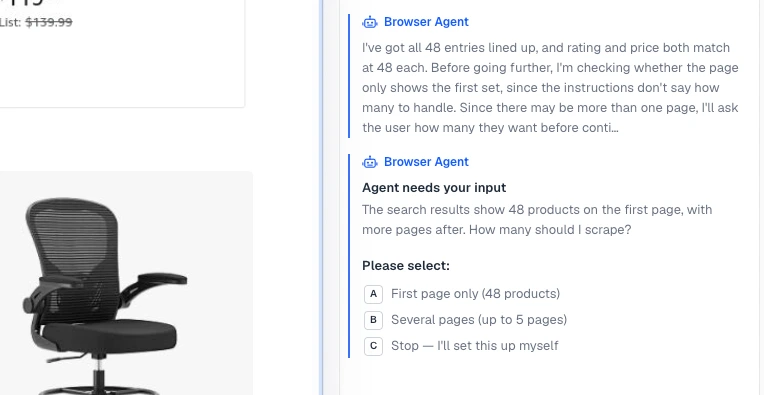
The AI agent asks for what it needs to set up your bot: URLs, a link to your Google Sheet or another data source. Speed things up by adding all the info when describing the workflow.
3. The browser agent builds and tests the bot
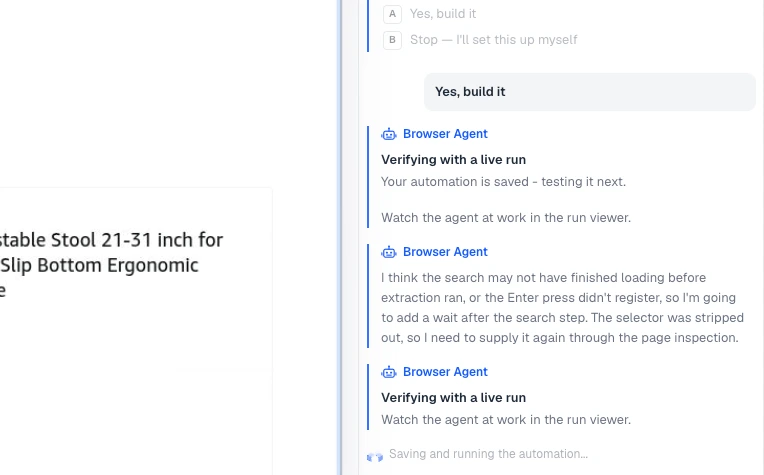
The AI agent visits the pages, picks the selectors for each step and connects the data from one step to the next. It also works out the clicks the page needs along the way, such as a cookie banner. Once done, it does a test run.
Capabilities
What the bots can do in your browser
Bots can replicate how you work in the browser.

Read the data from any source
A Google Sheet, Excel, a CSV file, a webhook from another app.

Scrape every page of results
Picks the fields you name and pages through the results with Get data from a webpage.

Click, type and navigate
Maps each thing you do on the page to a no-code step, such as Click element or Enter text.
Log in with your saved credentials
Adds a login step in front of the page that needs it, using a saved login, with the 2FA code when the login has one. The AI agent never sees the password.
Work in your own logged-in session
Uses the session on your machine without storing it. Stored cookies for cloud and scheduled runs.
Get past bot detection
Turns on bypass bot detection and iframe handling when the site calls for it.

Write the data to any source
A Google Sheet, Excel, a CSV file, a webhook to another app, one row per item.
Fix a failed run
Opens the page, works out what changed, repairs the step and runs the bot again.

Create custom steps
When a no-code step does not work on the site, the AI agent writes a custom JavaScript step.

Use AI in the run
Generate text or make a logic decision from a prompt with the Integrate AI step while the bot runs.
Places to start
Automations browser agents can build
Start from blank and make your own, or one click sends the description to the extension and the AI agent starts building.
See the guides for moreScrape search results into a Google Sheet
- Go to Amazon search results for standing desks
- Get the title, price and rating
- Do every page of results
- Add them to my Google Sheet
Log in and download a report to Google Drive
- Log in to app.example.com
- Go to Reports
- Click Export CSV
- Save the file to Google Drive
Data entry from a Google Sheet into a web form
- Read each row of my Google Sheet
- Open the signup form
- Fill in name, email and company from the row
- Submit and go to the next row
Monitor a price and get an email alert
- Open this product page
- Get the price
- If it is lower than last time, email me
- Run every hour
Scrape data from a list of links in a Google Sheet
- Open each link in column A of my Google Sheet
- Get the business name, address and phone
- Write them in the same row
Submit a Google Form for every row of a Google Sheet
- Read data from a Google Sheet
- Go to the Google Form
- Enter the data from the sheet
- Submit, then write Submitted in the row's last column
Our first principle
Bots, not AI agents, should do the work.
Agents are powerful, and we use that power where it counts: understanding your workflow, building the bot and testing it. The work itself we give to a bot, because a bot is the right tool for a job that repeats. It runs as code, so it does the same thing on every row and every run, it keeps your data to itself, and it costs a fraction of an agent working the page each time. Use the agent to build, and a bot to run.
A bot is predictable
It runs the same steps the same way, on row one and on row fifty. There is no model in the run deciding what to do next.
A bot is editable, an agent is not
Open any step of the bot in the no-code Builder, check what it does, change it or add to it by hand. An agent's behaviour lives inside a model: there is nothing to open, nothing to pin down, and no way to make the same small change stick from one run to the next.
A bot keeps your data to itself
When the bot runs, no AI agent is in the loop: nothing but the bot touches the site or your data. The bot processes the data in a Docker container that is destroyed when the run completes. The AI agent only sees the pages it needs while it builds, in a sandbox browser, and keeps nothing.
The AI agent builds, the bot runs
The AI agent does the hard part once: works out the steps, sets them up and tests them. What it hands over is a codified bot, ready to run on demand or on a schedule, for as long as you need it.
FAQ
Browser agents and the bots they build
Add to ChromeThe browser agent is trained to automate Chrome using our no-code steps. It works in our cloud browsers to replicate the workflow you describe, then creates a bot from it by assembling the no-code steps into a script you can run on a schedule, through the API or on demand. The agent is harnessed to prevent rogue actions, and it is not part of the run. You interact with it as it builds, answering its questions and adding input of your own.
Yes, in two ways. The browser agent in the Chrome extension uses our cloud Chrome browsers to build and test your bots. And if you are building an agent of your own, the same cloud browsers are yours to drive: the Claude MCP server opens a session and runs steps in it, and the Chrome API gives your code a fresh Chrome over CDP. Either way the browser runs in our cloud, with no Chrome to install or servers to manage.
Yes, two ways. With a stored credential: the agent adds a login step in front of the page that needs it, and the password is filled in at run time, so the agent never sees it. Or with your browser's cookies: the agent works in the session you are already signed in to, and stored cookies carry it into cloud and scheduled runs. The Step API logs in the same way from your own code, with enter text and click steps, and the session keeps the cookies for the rest of the run.
A chatbot answers in text. A browser agent acts: it opens a web page, reads it, clicks, types and moves on, the way a person at a keyboard would, so it can get a task done on a site rather than tell you how. The browser agent in axiom.ai goes one step further. It does the task in a cloud browser to work out the steps, then turns them into a bot, so the task runs again without the agent.
Through a real browser. The agent loads the page, reads what is on it, and chooses an action: click an element, type into a field, pick from a list, scroll, open the next page. It reads the result and chooses again until the task is done. The browser agent in axiom.ai does this in a cloud Chrome, and records each action as a no-code step, such as Click element or Enter text, with the selector that finds the element on the page. Those steps are the bot.
Yes. Filling a form is the most common bot the agent builds: it reads each row from your sheet, enters the values, picks the options and submits, then moves to the next row. See automate data entry into Google Forms for every question type it handles. Booking an appointment is a form with a date picker and a login in front of it, and the agent handles both: it signs in with a stored credential and writes a custom step for the picker when the normal typing steps do not work. Test runs do not submit, so nothing is booked until you turn the submit step on.
Yes. axiom.ai is a Chrome extension with a browser agent in it. Describe the workflow in the extension and the agent builds the bot there, in the same no-code Builder you can open and change. The bot then runs from the extension too, on your machine or in the cloud. Add it to Chrome to try it.
Yes. axiom.ai works with Claude through the MCP server and the Step API: Claude opens a cloud browser session, runs steps in it and triggers your saved bots. Claude can also build axioms: with the axiom skill in Claude Code, describe the bot and Claude writes the no-code steps, which you upload to the extension.
Yes. axiom.ai offers an MCP server and a Step API. The MCP server gives an agent such as Claude a cloud browser to drive, with the same steps the no-code bots use, and lets it run and build your saved bots. The Step API gives your own code the same steps as Node functions, so an agent you are building can open a page, click, type and scrape without managing a browser.
The agent only sees what it needs to build the bot. It opens the site in a sandbox browser, reads the pages it needs to work out the steps, and keeps nothing. Your password never reaches it: a stored credential is filled in by the login step at run time. Once the bot is built, the agent is out of the picture. The bot processes your data in a Docker container that is destroyed when the run completes, and axiom.ai does not save, duplicate or share your data with any third party.
Traditional tools, such as Selenium, Puppeteer and Playwright scripts, or a recorded macro, run a fixed set of instructions: fast, cheap and predictable, but someone has to write them, and they break when the page changes. A browser agent needs no script. It reads the page and decides what to do, so it copes with pages it has never seen, but it is slow, costs a model call on every step, and can take a different path each run. axiom.ai offers a hybrid of the two. The agent does the part that needs judgement, working out the steps and fixing them when the site changes, and the bot it builds runs as a fixed script, so you get the predictability and cost of traditional automation with none of the writing.
Yes, to start. New users get a limited amount of agent time to build their bots as part of the free runtime. Once it is used up the agent is disabled, and your bots keep running. Subscribers get a set amount of agent time with their subscription tier. See pricing for the tiers.
Yes. Add your API key in the dashboard. Claude, ChatGPT, DeepSeek and Perplexity are supported, and we add other models when users ask for them.
Yes. Every bot the AI agent builds can be edited and extended by hand in the no-code Builder. Open any step and change it, add one, delete one, run it again.
Build a bot with a browser agent that does your work.
Describe it, the AI agent builds it. Start for free. No credit card required.