Can I ( A no-coder) use Puppeteer to submit a form
I can automate data entry (opens new window) and form submission without writing a single line of code. I'm a no-code automation expert. I build workflows without touching JavaScript.
This week, it’s time to shake things up. Axiom has just released a new tool that lets you run multiple Puppeteer scripts concurrently in Chrome browsers directly from the command line.
Now's the perfect time to level up and learn some Puppeteer. Following on from coding a simple web scraper (opens new window), I'm now going to automate a web form with code. If you’re a Puppeteer expert, give our new tool (opens new window) a spin.
Why I’m not saying “use AI” when everyone else is hyping it: LLMs just aren’t suited to this. They’re costly, error-prone, and bad for the planet. Code or no-code is faster and cleaner. Use LLMs to learn, but not for repetitive tasks.
If you’re learning like me, Hi I’m Alex Barlow, co-founder of Axiom. Let’s dive in.
# How do I automate forms without code?
I first select the source of my data, usually a Google Sheet or webhook. I look at the web form, then add the necessary steps in the no-code builder (opens new window) to create my workflow. Before I can test the bot, I need to select the elements and connect the data, and I'm done.
My no-code experience will be useful here. I’m betting that many of the same steps (opens new window) we have in Axiom map directly to methods in Puppeteer.
# Why Puppeeter and not Playwright?
We’ve built a tool that runs code remotely in Chrome browsers using CDP (opens new window) a WebSocket-based API that enables programmatic interaction with Chrome and Chromium-based browsers, and I want to learn how to use it. I have extensive knowledge of browser automation, but I'm not familiar with coding bots. If I am to work with the team in developing the tool, I need to learn. The new tool can also run Playwright, but I am choosing Puppeteer becuase our no-code tool extends it.
# Tools I will use, including an AI
I will be using an AI, probably ChatGPT or Claude, to help me learn how to script Puppeteer automations. AI is a great learning tool and helps me avoid bugging our CTO with stupid questions. I will also be using Cusor to script and run my automation.
Finally, I will be running the script with Axiom's new endpoint for browser automation. (opens new window)
# Get setting up with Axiom
An Axiom account is required to run code in our cloud. It's free to try; all new accounts get 30 minutes of runtime. No credit card required. We do not share user information with third parties or send marketing emails. This example code shows you how to connect to the service and open a window. I will use it as a starting point for coding my bot.
const browser = await puppeteer.connect({
		/// Insert my axiom API Key here
    browserWSEndpoint: " Insert Api key"
});
const page = await browser.newPage()
/// Set window size
await page.setViewport({ width: 1960, height: 1080 });
/// Insert URL of webform I wish to automate
await page.goto("URl")


await page.close()
await browser.close()
# What puppeteer commands should I use?
Off the bat, I could be lazy and ask an LLM to write the code for me. But I want to learn. So instead, I’m using generative AI to research Puppeteer commands.
The first thing I learned was about Puppeteer's Page class and the methods it provides for interacting with an open browser tab, such as navigating to URLs, clicking elements, typing text, and taking screenshots — all the good stuff we browser automators like.
# What does "await" mean?
In the course of my research, I learned that Puppeteer’s methods are asynchronous. That means they start an action and move on without waiting for it to finish. When we interact with a web page, we do things synchronously — we click, wait, then move to the next step. So imagine the chaos if a script tried to fill in every form field at once!
I found that these asynchronous methods return a promise — “I’ll let you know when this is done.” The await tells JavaScript to wait for that promise before running the next line. It stops the script from firing off everything in one mad rush, making the automation more human-like.
# How to input text into a field using puppeteer
To enter text into a field, I use the type method. This method works like saying:
“On this page (the current tab), type this text into the element that matches this selector.”
For example:
// Types text into an input
await page.type('#username', 'myUser');
I also learnt you can use another method fill which is faster but type is more human as it simulates key strokes.
# How to automate a sleect list using puppeteer
To chose an option from a select list, I use the select method. This method works like saying:
“On this page (the current tab), select X on the element that matches this selector.”
For example:
// Select an option by its value attribute
await page.select('#mySelect', 'optionValue');
optionValue is th evalue you want to select.
# How to click an element using puppeteer
To click an element like a link, I use the click method. This method works like saying:
“On this page (the current tab), select and click element that matches this selector.”
For example:
await page.click('#loginButton');
You could also try co-ordinates, see example:
await page.click('#loginButton', { offset: { x: 10, y: 5 } });
# How to select radio button using puppeteer
To click a radio, I use the click method again. This method works like saying:
“On this page (the current tab), select and click radio that matches this selector.”
For example:
await page.click('input[type=radio][value=cat]');
# Last but not least, How to use a keypress to automate website actions
To replicate keyboard actions, I can use the keypress method. This method works like saying:
“On this page (the current tab), press this key.”
For example:
await page.keyboard.press('Enter');
Typically, I use the no-code keypress step (opens new window) in Axiom to submit forms or tab between elements. I can, of course, do the same with code.
# Coding the bot
First up, I’ll insert my API key and the URL of the web form I’ll automate, in this case a demo page.
const browser = await puppeteer.connect({
		/// Insert my axiom API Key here
    browserWSEndpoint: "eyJ1c2VyX2lkIjoxOTUzNzMsInRva2VuIjoiMTk1MzczNDZhMTA4OWIwYmQzZWRmNyJ9"
});
const page = await browser.newPage()
await page.setViewport({ width: 1960, height: 1080 });
/// Insert URL of webform I wish to automate
await page.goto("https://axiom.ai/demo/webform/")

await page.close()
await browser.close()
# Selecting Puppeteer methods to automate the form
Now into uncharted water I have done this without code using Axiom, just never with code. Looking at the form I see I will need:
- The
typemethod to submit name and email - The
Selectmethod to select an option on "How did you find us" select list - A
clickmethod to select a radio - Finally, A
clickmethod to click submit
I add five lines of code. For each one, I also need a CSS selector. To work out my selectors, I use Chrome Inspector, a tool I’m familiar with and use a lot when building no-code automations.
const browser = await puppeteer.connect({
		/// Insert my axiom API Key here
    browserWSEndpoint: "eyJ1c2VyX2lkIjoxOTUzNzMsInRva2VuIjoiMTk1MzczNDZhMTA4OWIwYmQzZWRmNyJ9"
});
const page = await browser.newPage()
/// Set window size
await page.setViewport({ width: 1960, height: 1080 });
/// Insert URL of webform I wish to automate
await page.goto("https://axiom.ai/demo/webform/")
// Enter name added css selector
await page.type('#name', 'myUser');
// Enter email added css selector
await page.type('#email', 'myUser');
// Select list added css selector and value
await page.select('#howFound', 'Referral');
// Radio added css selector
await page.click('#optInYes');
// Submit form added css selector
await page.click('.submit-btn');

await page.close()
await browser.close()
# Testing and running the Puppeteer script
There are two ways to test my bot.
- Run the script from console or in cursor by simply entering
node form-entry-bot.js. - Alternaticaley I can run the script inside the tools "Playground" feature which is found in the pro-code web app (opens new window).
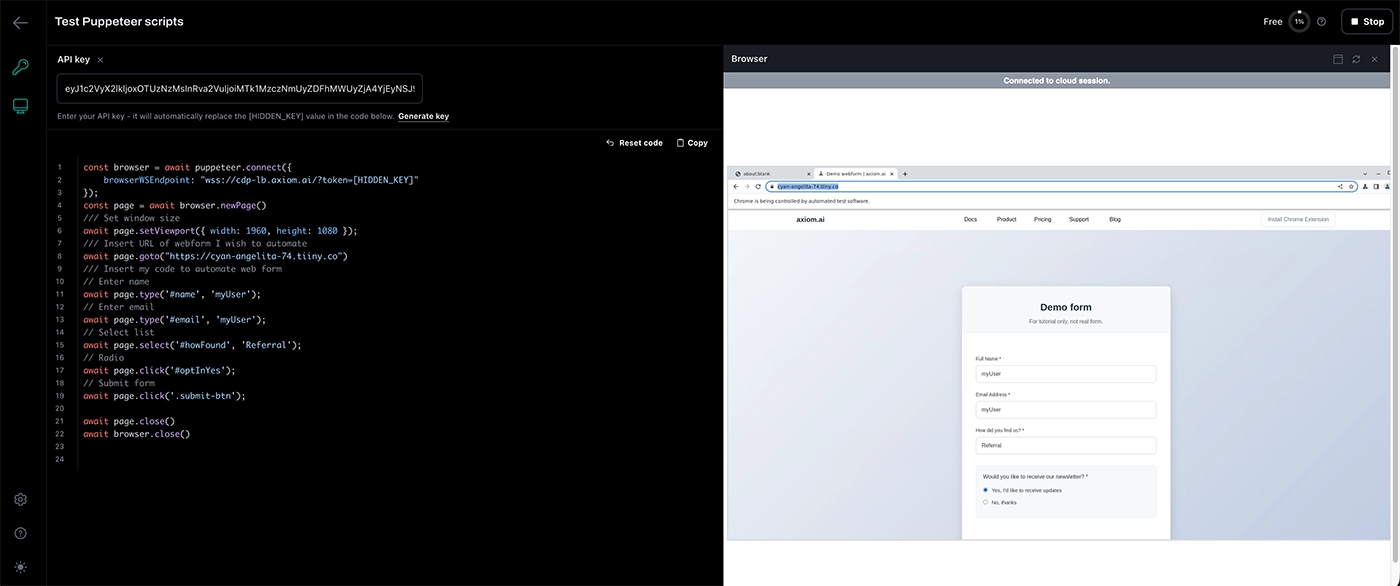
Each method has pros and cons. From the command line, you can’t watch the run, but you do get feedback on the run state, errors, and other details. In the Playground, a preview opens so you can watch the run — as shown in the screenshot below.
# Minnor tweak to the code
I tested the script in the desktop Playground. The click on the submit button wasn’t visible on the page, so I added a line of code to scroll. The page also closed too quickly, so I added a wait to keep it open. Other than that, it worked perfectly.
await page.evaluate(() => {
    document.querySelector('.submit-btn').scrollIntoView();
});
// Submit form
await page.click('.submit-btn');

// Wait to see the result
await new Promise(resolve => setTimeout(resolve, 5000));
# Wrapping up — yes, a no-coder can learn Puppeteer and automate a form, but should you?
I've been using Puppeteer for years without really understanding much about the underlying code through Axiom's no-code tool (opens new window). One customer even said it's 85% faster than writing your own Puppeteer script.
I've really enjoyed digging deeper into code, even though I've only scratched the surface. It's been good to learn about the page class and methods such as click. The process I went through, using AI for help, working in a tool like Cursor, and having an endpoint to test my scripts, made it easy to get up and running. No wrestling with NPM, which can be a real pain.
I also learned about await, and that the page methods in Puppeteer return a promise when they are completed.
As a no-coder, I can now automate forms (opens new window) with or without using Puppeteer. So which would I choose? I’ll be honest, I’d choose lazy every time. It's just quicker and easier to use the no-code builder. Even if I were a proficient coder, I'd still pick no-code. That said, I've really enjoyed learning more about how Puppeteer works, so I'll keep digging deeper and trying new things.
Next, I might learn how to loop methods with code, a feature I use in the no-code tool all the time. That's going to be fun 😃