Can a no coder build a web scraper with Puppeteer?
While axiom.ai automations can be triggered manually, there are methods of automatically triggering these, or even just manually triggering them from a third-party service. This allows for your automations to be included in a larger workflow, or include other services in your current workflow. In this article, we are going to discuss triggering your automations from third-party services such as IFTTT, Make, Zapier, Power Automate and Supabase - we have additional guides for all of these services if you wish to take a deeper dive, check out the sections below for more details.

IFTTT
IFTTT (If This Then That) is a web-based service that automates tasks by connecting apps, devices, and services through simple conditional statements called "applets." These applets can include triggers for your automations, including sending information over that can be used later in your automations. Your applets can also be triggered directly from your automations. You may find that you already have an established library of IFTTT applets that could benefit from integrating with axiom.ai.
Personally, I found this helpful with managing my homes energy usage. As a member of Octopus Energy, my energy prices change throughout the day depending on how much "clean" energy is being produced on the grid here in the UK. I make use of the "Agile Octopus" integration within IFTTT to trigger an axiom.ai automation anytime the price of energy drops below 10p/kWh so I can be notified and turn on all of my power hungry appliances!
Guide: How to trigger axiom.ai automations using IFTTT
Make
Make (formerly Integromat) is a visual platform for building and automating workflows by connecting apps, services, and devices through customizable integrations and logic-based scenarios. These workflows offer powerful options when it comes to allowing logic to be introduced to your workflows, similar to the logic steps that are offered within axiom.ai.
We have seen some pretty inventive automations created to make use of Make workflows come through our Support team, including the automation of Telegram messages or even the automation of their Etsy store.
Guide: How to trigger and post data to Make with an axiom.ai automation
Power Automate
Power Automate is a Microsoft platform that enables users to create automated workflows between apps and services to streamline tasks, integrate systems, and improve productivity. It can be useful for a wide variety of tasks, from simple social media automation to reporting on system stats and system monitoring. Something to note when it comes to Power Automate is that there are two versions: the desktop version that can be used to access system resources, and the online version that is more of an automation platform. It would be best to review the platforms to determine which one suits your needs best. The online version is cross platform, which has it's benefits, but has more limited functionality.
An interesting use case for this may be to report the status of a system that has been designated a server - for example, if you'd like to trigger an automation to run when a server hits a certain memory threshold, you could do this by setting up a Power Automate workflow on that server that then triggers your axiom.ai automation. You could then have your automation send an email, or send a message along to Slack - check out our Slack guide for details on how to integrate Slack.
Guide: How to trigger axiom.ai automations using Power Automate
Zapier
Zapier is an automation platform that connects apps and services, enabling users to create workflows called "Zaps" that perform tasks automatically based on triggers and actions. Zapier has a massive library of over 1,000 integrations that can be integrated into your Zaps - and guess what one of those integrations is? You guessed right (I hope) - axiom.ai! You can search for axiom.ai right in your Zapier library and get started pretty quickly.
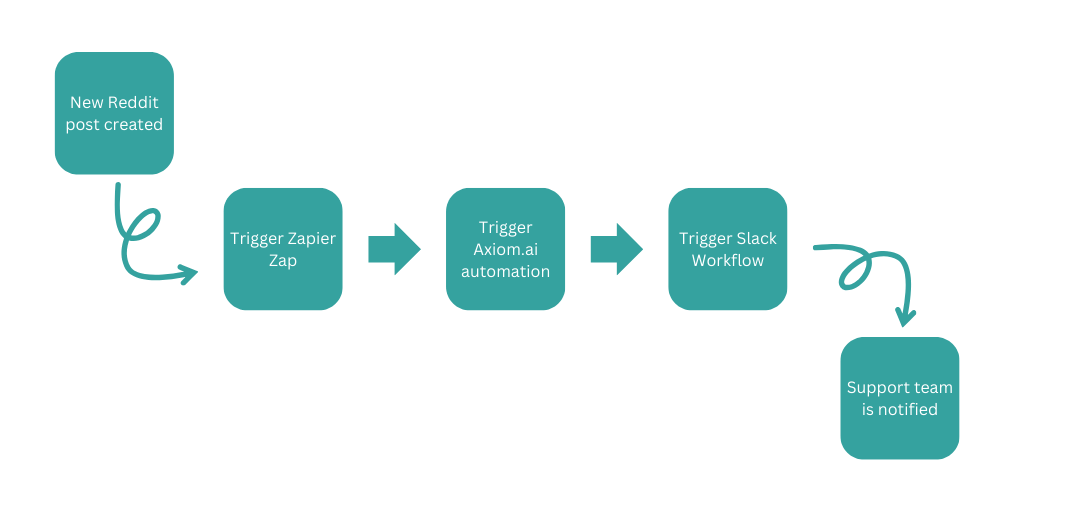
Internally, we use this integration quite a bit. To help manage our Reddit community we have a Zap that detects when new Reddit posts are made within our community. When a new post is made in the community it will trigger the Zap, that will then trigger the axiom.ai automation which sends the data onto a Slack workflow which drops a message in our "#reddit-new-posts" channel, ready for our Support team to review! Check out our Slack guide for details on how to integrate Slack.
Guide: How to trigger Zapier Zaps using axiom.ai
Supabase
Supabase is an open-source backend-as-a-service platform that provides developers with tools like a Postgres database, authentication, and real-time APIs to build scalable applications. As a backend-as-a-service platform it helps you store data at scale - combined with your axiom.ai automations, it can really help you store the data that you are working with. For example, if you wish to store large amounts of data that you have scraped, Supabase can be useful for storing that data. This can be a great alternative to Google Sheets as it provides a better platform to manage data at scale, plus your data can be exported to be used in your favourite spreadsheet software, if required.
As a Firebase alternative, we've seen instances where this data has been fed into a Supabase database to then be used to power other website through their Postgres database offerings. As a developer myself with plenty of experience with Firebase, Supabase offers a great alternative that when combined with your axiom.ai automations could offer quite a lot of opportunities.
Guide: How to automate Supabase with axiom.ai
Wrapping up
All of the services above offer various advantages when used with axiom.ai to power up your automations. Even if you are not passing data to your axiom.ai automations, the simple act of triggering them from a third-party service can give you the ability add additional features to your workflows - from something as simple as notifications, to triggering completely separate workflows using logic steps within any of the apps above.