Build a web scraper without writing a single line of code

Tools like Python, Selenium, or Puppeteer are the go-to options for developers looking to scrape data from websites. But what if you're not a coder? Building a web scraper is a tad daunting. Thankfully, the no-code scraper market has evolved dramatically, offering powerful tools to create scrapers without writing a single line of code.
You can now bypass bot detection, scale your scrapers using concurrency, and achieve results comparable to those created with traditional coding. These advancements make no-code tools an increasingly viable option, even for developers who might typically favor coding their web scrapers.
This guide is for both non-technical users and developers. We'll explore the everyday challenges of web scraping, why no-code tools are gaining the edge, and which tools can help you create web scrapers quickly.
If you want to learn more, I will also demonstrate how to create a variety of scrapers for different use cases using Axiom.ai, a no-code tool that allows you to combine steps to create custom web scrapers in seconds.
Here's a quick overview of what we'll cover and the scrapers we'll build.
- What are the challenges of web scraping?
- Why no-code now has the edge?
- How do you pick the best tool for web scraping?
- How to make no-code web scrapers with Axiom.ai
- Running your web scrapers
- Bot blocking
I'm Alex, co-founder of Axiom.ai - let's dive in!
# What are the challenges of web scraping?
Having all your data neatly extracted and in your Google Sheet feels great. But getting there can be a tricky process. Many websites block or confuse scrapers, making data extraction challenging.
Here are some of the most common challenges I encounter:
Varying page templates: Pages within the same site can have different structures, requiring custom logic for each one.
CSS class obfuscation: Dynamic and unpredictable class names make locating elements harder.
Missing elements: Content might only load after user interactions or be hidden entirely from scrapers.
Anti-bot measures: Tools like Cloudflare and other CAPTCHA systems actively block automated access.
CDNs: Distributed networks and throttling mechanisms limit the rate of data extraction.
For coders, these issues mean hours spent debugging, writing exception-specific logic, and integrating tools like Puppeteer Stealth. It's an ongoing arms race to outsmart anti-scraping measures, requiring bucketloads of patience and persistence.
# Why no-code tools now have the edge
Web scraping has traditionally been the domain of coders, but that's no longer the case. No-code tools have matured, making it possible to assemble web scrapers using intuitive user interfaces quickly. These tools also offer advanced features like bot evasion with straightforward configuration. You can even run your scrapers on your desktop or in the cloud without setting up a server—no more "PIP Install." Just click run.
Easy assembly. No-code builders now allow anyone to assemble simple or complex scrapers in minutes. You get all the functionality of programming languages but in a simplified, user-friendly format.
Powerful configuration. No-code tools have leveled up. They now provide advanced options to optimize scrapers, including proxy usage and built-in anti-bot measures like Cloudflare evasion.
Effortless scalability. Concurrency features let you deploy an entire army of scrapers. Managing a stack to run your scrapers on—well, that's now done for you. All you need to do is click run.
Does coding a web scraper and setting up your own server still make sense? No-code solutions offer a faster, simpler, and more efficient alternative, even for the most dedicated developers.
# How to pick the best tool for web scraping
When selecting a no-code web scraping tool, the complexity of your task should be your top consideration. If you only need to extract small amounts of data from straightforward or formulaic web pages, an AI-powered scraper or a tool with pre-built templates is likely sufficient.
However, not all web scraping tasks are that simple. For more complex use cases, such as automating browser interactions to access dynamic or hard-to-reach data, you'll need a tool that offers the flexibility to build custom scrapers.
For large-scale scraping projects involving hundreds of thousands or even millions of pages, enterprise-level solutions are often necessary to handle the scale.
To make choosing simpler, I've grouped web scraping tools into three main categories:
# 1. AI/Template scraper tools
These tools are ideal for quick scraping tasks. They rely on pre-built templates or AI-driven automation to scrape pre-defined data, like profile data.
- Best For: Beginners, non-technical users, and those with straightforward needs.
- Advantages: Fast setup, minimal learning curve.
- Examples: Bardeen.ai (opens new window),Magic (opens new window)
- Limitations: Limited customization is less suited for dynamic or complex websites.
# 2. No-code web scrapers with builders
No-code builder tools allow you to configure custom scraping workflows, giving you more control. You can visually select elements on a page, define rules, handle pagination, and even integrate with APIs or automation platforms such as Zapier and Make.
- Best For: Users with moderate to advanced requirements who need more flexibility.
- Advantages: Customization options, ability to handle dynamic content, tools for proxy management and anti-bot measures.
- Examples: Tools like Axiom.ai (opens new window), ParseHub (opens new window), or Octoparse (opens new window).
- Limitations: Slightly steeper learning curve than AI/template tools.
# 3. Enterprise web scraping solutions
Enterprise-grade tools handle large-scale, complex scraping projects and offer advanced features like data normalization, machine learning, and real-time integration with databases or analytics platforms.
- Best For: Businesses or teams with significant data needs and technical expertise.
- Advantages: Scalability, robust anti-bot systems, and dedicated support.
- Examples: Tools like Bright Data (opens new window) or Oxylabs (opens new window)
- Limitations: Expensive and may require technical assistance to manage effectively.
# How to make no-code web scrapers with Axiom.ai
Let’s keep this simple so you can get started quickly; I will assume you have Axiom.ai installed already.
I'll walk you through design patterns for common use cases. You can quickly replicate them using the step finder in the builder and customize them to suit your needs.
For an even easier setup, I’ll include links to templates (opens new window). Once your scraper is ready, just click run to get started.
- How to get started web scraping (opens new window).
- How to use the selector tool (opens new window) to choose an element to scrape.
- How to use the no-code builder (opens new window).
- How to pass data between steps (opens new window).
- How to run your web scrapers (opens new window).
# 1. Scrape links from a listing page
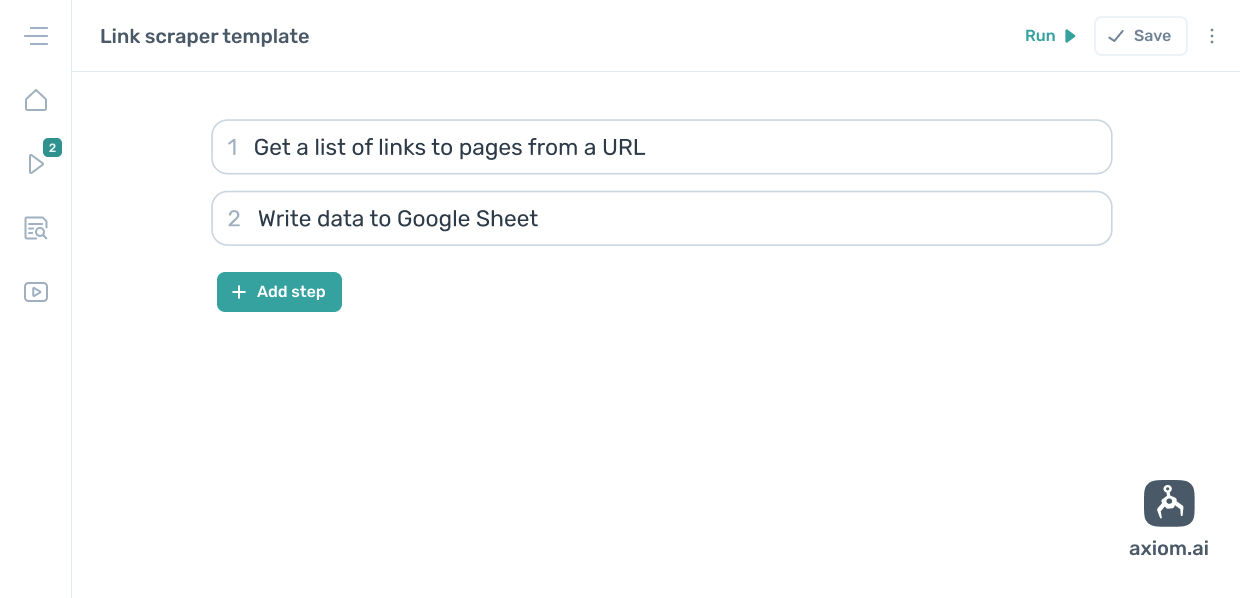
Create your first no-code web scraper in just a few seconds! This scraper will extract a list of links and save them to a Google Sheet. Open Axiom.ai's no-code bot builder (opens new window), then add the steps visualized above, replicating and configuring them as you go.
If you feel like cheating, we have a template you can try.
# 2. Loop through URLs, scraping web pages
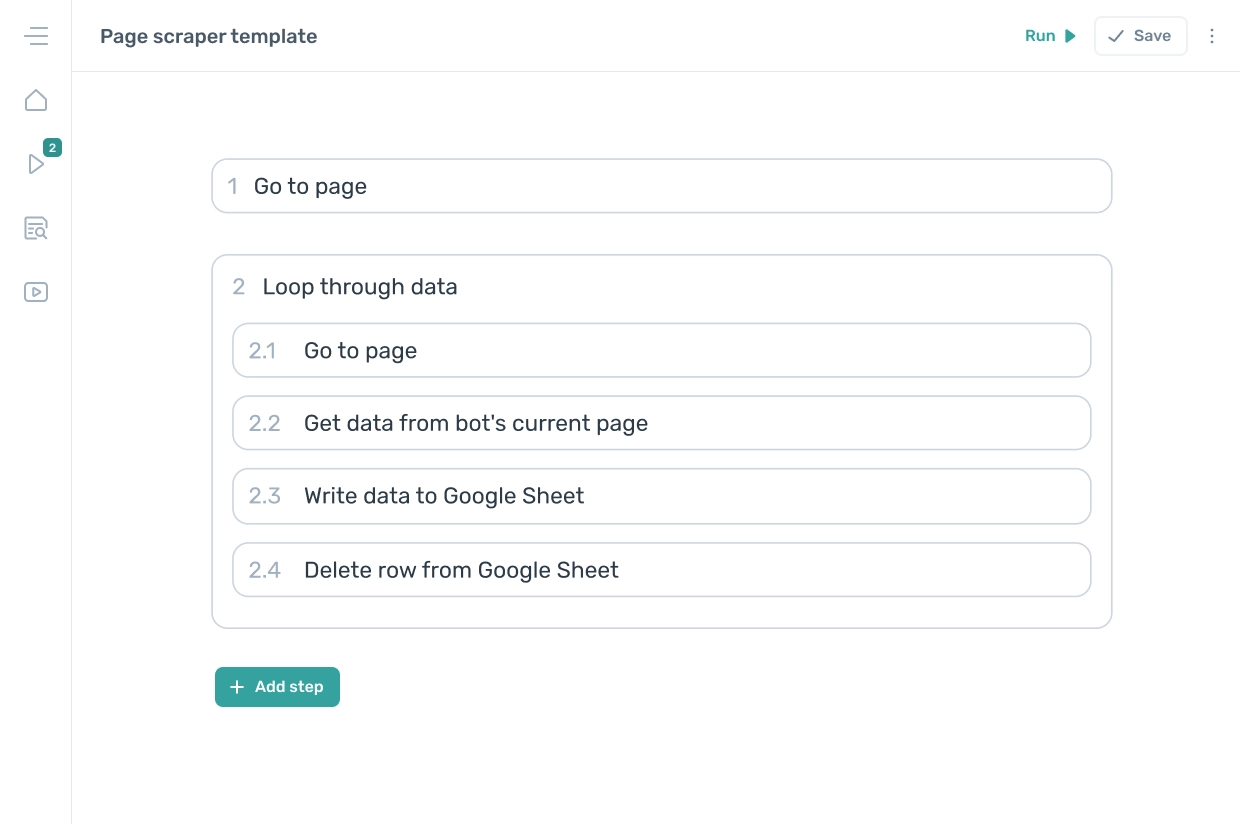
An everyday use case is looping through a list of URLs in a Google Sheet, scraping data from the pages, and writing it to a Google Sheet. To do this, add and configure the steps illustrated above. This scraper is best suited to webpages that share a standard template with structured data, like product pages in an e-commerce store.
Give the template a try.
# 3. Loop through URLs, scraping web pages using AI to extract unstructured data.
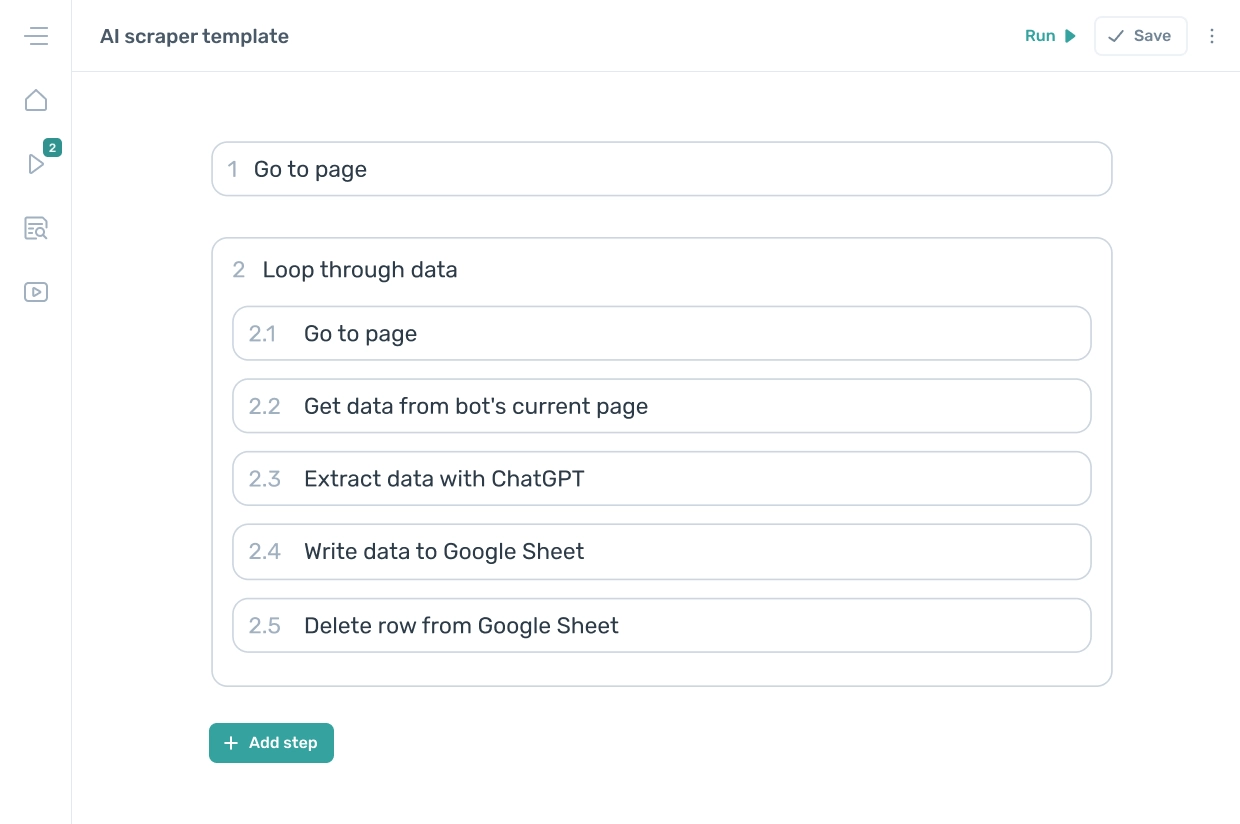
This is a web scraper design pattern for extracting unstructured data. It will loop through URLs, scrape the body, and then use ChatGPT to extract the data you specify. This scraper works great when page layouts vary or when scraping multiple websites. You will need your own ChatGPT account and API key.
To set this template up, you will need to scrape the "body" text or HTML. Use the options found in the step "Page HTML" or "Page text ." Alternatively, try the template.
# 4. Extract and download files
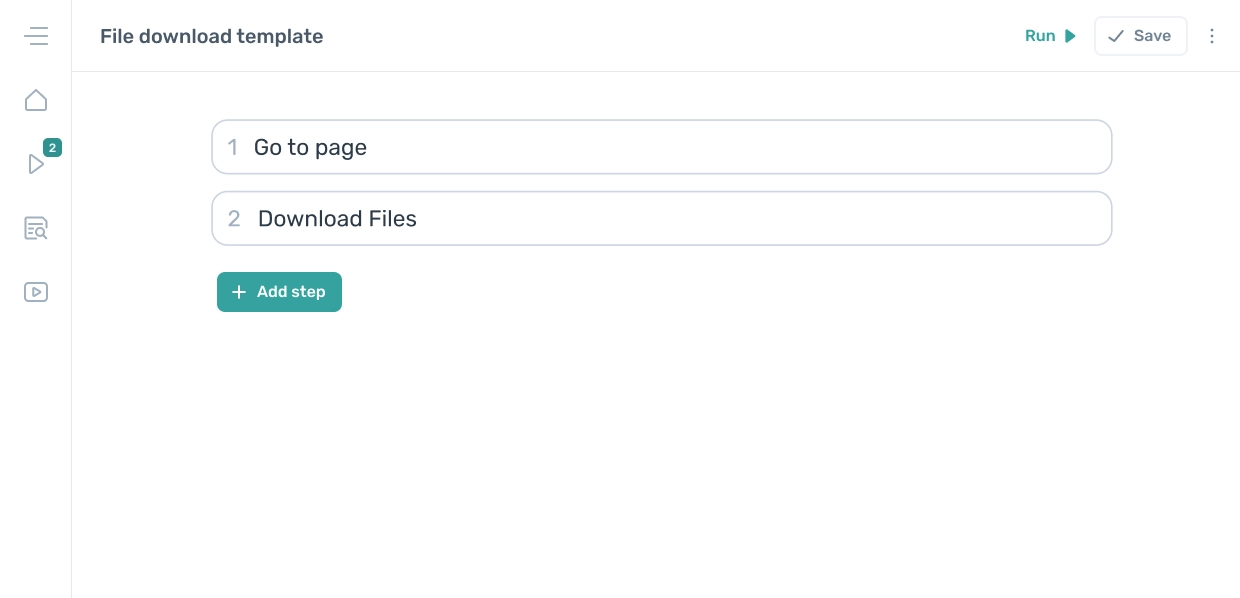
Another common use case for web scraping is extracting files. This design template shows how you can use a bot to download files to a specified folder on your computer. You can try the template here (opens new window).
# Running your web scrapers
When you build your scraper with Axiom.ai, the infrastructure is fully set up and managed for you. It's as simple as clicking run! You can run (opens new window) your bots on the desktop, in the cloud, or on your own VPS.
Depending on your subscription (opens new window), you can also run multiple bots (opens new window) in the cloud and schedule (opens new window) them on your desktop, VPS, or cloud setup. If you need custom infrastructure solutions, feel free to contact our support team (opens new window) with your requirements.
# Bot blocking
One of the most frustrating parts of web scraping is spending time building and perfecting your scraper, only to have it blocked by anti-bot measures. The website may stop loading and display a turnstile or CAPTCHA request instead. Thankfully, there are simple steps you can take to bypass these obstacles.
- Try this if you encounter turnstile blocking by Cloudflare (opens new window).
- Integrate with the 2Captcha (opens new window) service if you hit the traditional captcha.
- Turn on cookie sharing (opens new window) to share your session in the cloud.
- For Chrome Profile (opens new window) sharing, try this.
- Try this to add your custom Proxies (opens new window).
# Other useful features
Axiom.ai offers a host of other features worth exploring. If you want to dive deeper into no-code web scraping and master Axiom.ai, these resources might be helpful:
- Custom CSS Selectors (opens new window): Learn how to target specific elements on a page for precise scraping.
- Optimizing Scraper Speed (opens new window): Tips to make your scrapers faster and more efficient.
- Learn to Loop (opens new window): Master looping through lists or multiple pages for larger-scale scraping.
- Using logic (opens new window): Master using logic in your no-code web scrapers.
# Wrapping up
Web scraping has evolved from a developer-exclusive skill to something anyone can do with no-code tools like Axiom.ai. These tools also tackle the complex problems in web scraping, like bot detection and scalability, while simplifying setup and customization.
We covered:
- The everyday challenges of web scraping.
- How no-code tools now rival coded solutions
- Practical design patterns and templates for tasks such as extracting links, looping through URLs, handling unstructured data, and downloading files.
- Advanced features like bot-blocking and custom infrastructure options.
Have all the challenges been solved? Not yet. However, no-code tools have sped up the process, making web scraping easier. Whether handling small datasets or tackling large-scale projects, Axiom.ai provides everything you need, but like anything new, there's a learning curve.
Please share your input if you are a power scraper, coder or no-coder. Above all, we value our users and do our utmost to build the features you need. Please share features or feedback that can help shape Axiom.ai (opens new window).
Have you any tips and tricks you've learned while using Axiom.ai to help others? We would love to hear from you over in our community (opens new window).