Trigger a web scraper from n8n and get the data back
How to trigger a web scraper from n8n and get the data back: install the Chrome extension, click Build from description, tell the agent what you want, and follow its prompts. A working bot is built and tested in minutes.
Here is how the automation works. To trigger a web scraper from n8n, add an HTTP Request node that posts the URLs to https://lar.axiom.ai/api/v3/trigger. The cloud run takes them in a Receive data from another app step, scrapes the page, and a Trigger webhook step posts the data to a second workflow with a Webhook node, which sends it on. Any n8n trigger will do: a schedule, a new row, a form, another app, on n8n cloud or a self-hosted instance. The n8n integration page covers both directions in overview.
Build the n8n scraper from a description
Describe it and click the button: the agent builds and tests the scraper in your Chrome extension; the two n8n workflows are set up in n8n, in the questions below. Webhooks need a plan that includes them (pricing) and your API key (Authentication).
- Take the URL someone submitted in my n8n form
- Open it and scrape the title and price
- Post what was scraped to my n8n webhook
You need an n8n account or instance; a self-hosted instance must be reachable from the internet for the results to arrive. Make the second workflow's Webhook node first so you can give the agent its production URL, or leave the Trigger webhook step's Endpoint empty and paste it in later. Name the automation something you can type exactly, such as Scrape product pages.
Build the n8n scraper step by step
The steps the agent builds, as the Builder shows them: each step by its name, with the fields to set under it. Add them yourself in this order in the step-by-step builder, or open the agent's result there to adjust it.
- 1.0
Receive data from another appTest data: a table with the URL in the shape the workflow sends, one per row
- 2.0
Loop through data- repeats for every row in
[webhook-data]
- 2.1
Go to pageURL: the first column of[webhook-data]
- 2.2
Get data from bot's current pageSelect: the title and price on the page, one column each
- repeats for every row in
- 3.0
Trigger webhookEndpoint: the second workflow's Webhook node production URLPayload:[scrape-data]
Common questions about the n8n scraper
How do I start the scraper run from n8n with the HTTP Request node?
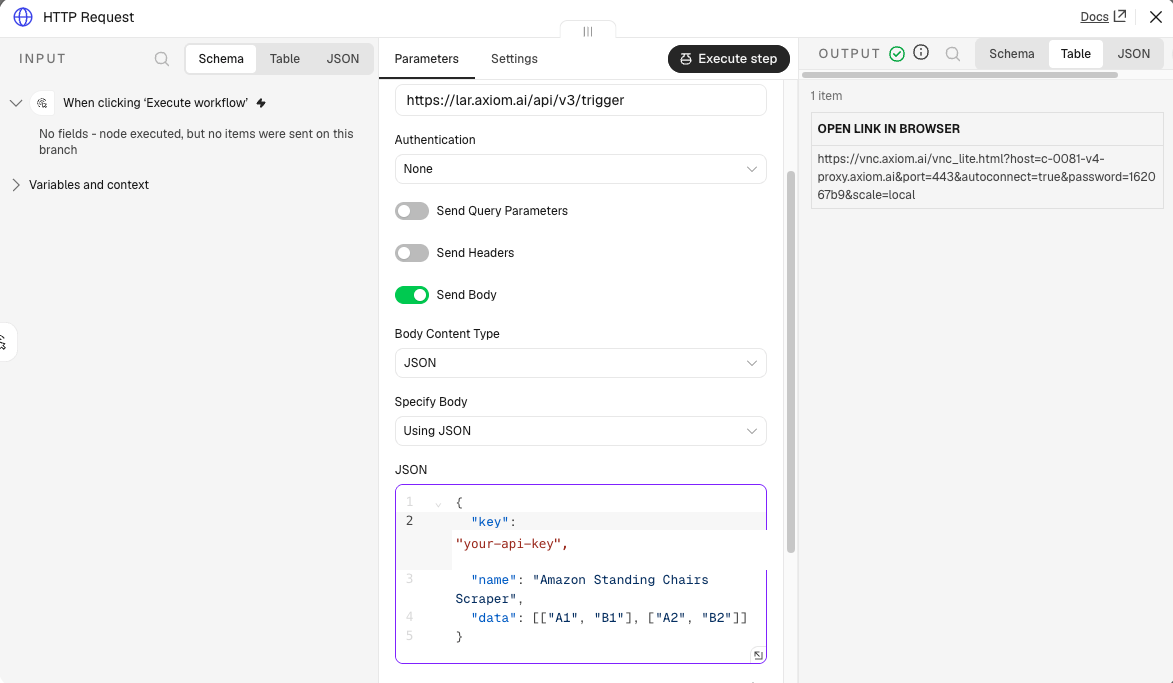
With an HTTP Request node after the workflow's trigger:
- In n8n, create a workflow and add the trigger node that suits the job: Form Trigger for a URL a colleague pastes into a form, or Schedule Trigger, Google Sheets Trigger, or any other.
- Add an HTTP Request node after it.
- Set Method to POST and URL to
https://lar.axiom.ai/api/v3/trigger. - Turn on Send Body, set Body Content Type to JSON and Specify Body to Using JSON.
- Paste the JSON below into JSON, with your own API key and automation name. Leave Authentication on None: the key goes in the body. Where the URL goes, use an expression that reads it from the trigger node, for example
{{ $json["Page URL"] }}for a form field named Page URL. - Save the workflow.
{
  "key": "your-api-key-here",
  "name": "Scrape product pages",
  "data": [["{{ $json["Page URL"] }}"]]
}
Click Execute step on the node. The trigger answers straight away:
| Response | What it means |
|---|---|
"OPEN LINK IN BROWSER" with a link | The run started. Open the link to watch it live. |
"status": "queued" | No cloud slot is free yet. The run starts within a few minutes. |
Task not found | name does not match the automation's name exactly, including case and spaces. |
Invalid key | key is wrong. Copy the key again from the dashboard's Credentials and API key view. |
The same call in cURL, useful for checking the key and name before you put them in n8n:
curl -s -X POST https://lar.axiom.ai/api/v3/trigger -H "Content-Type: application/json" -d '{"key":"your-api-key-here","name":"Scrape product pages","data":[["https://books.toscrape.com/catalogue/a-light-in-the-attic_1000/index.html"]]}'
Keep the key out of the node's JSON when you can. n8n's Header Auth or a Generic Credential does not work for this endpoint, which reads the key from the body, but you can store the key as an environment variable on a self-hosted instance and reference it with {{ $env.AXIOM_KEY }}.
How do I catch the scraped data in a second n8n workflow?
With a Webhook node as the second workflow's trigger:
- In n8n, create a new workflow and add a Webhook node as its trigger.
- Set HTTP Method to POST and Respond to Immediately. Give the path a name, for example
axiom-results. - Copy the Production URL. The Test URL only listens while you click Listen for test event, so use it for the first run and switch to the production URL once the workflow is active.
- Paste the URL into the Trigger webhook step's
Endpointand save the automation. - Click Listen for test event in n8n, run the automation once from the builder, and the scraped rows appear as the node's output under
body. - Add the nodes that send the data on: a Slack: Send a message node with the title and price pulled from
bodyby expression; for a sheet, Google Sheets: Append row.
Then activate both workflows and fire the first workflow's trigger: the run starts, scrapes, and the second workflow receives the data on its production URL. The automation's run reports show each run, and notifications can tell you when one fails.
Why does no scraped data arrive in n8n after I activate the workflow?
The Webhook node's test URL listens only while you click Listen for test event. Put the production URL in the Trigger webhook step before you activate the workflow, or the results have nowhere to go.
Why does the n8n HTTP Request node return Task not found?
The name in the JSON does not match the automation's name exactly, including case and spaces. An Invalid key response means the key is wrong: copy it again from the extension's settings. When a run fails, hand it to the agent and it repairs the step.
Can I send many URLs to the web scraper in one n8n call?
Yes. Put an Aggregate node before the HTTP Request node and build data with an expression such as {{ $json.urls.map(u => [u]) }}, one row per URL. One call is one run.
Can I trigger the web scraper from a self-hosted n8n behind a firewall?
Only if the Webhook node's URL is reachable from the internet, because the results come from axiom.ai's cloud. A tunnel such as ngrok works for testing.
Can I trigger a web scraper from n8n without code?
Yes. The scraper is built from the three lines above with no code, and the HTTP Request and Webhook nodes are standard n8n nodes; the only text you type is the JSON body and the one expression that reads the form field.
Can I trigger a web scraper from Zapier or Make instead of n8n?
Yes. See trigger a web scraper from Zapier and trigger a web scraper from Make. The plain request is in trigger a web scraper from a webhook.
Where do I get help?
Get in touch with support, or ask in the axiom.ai community.
Related guides
Trigger a web scraper from Zapier and get the data back
- Take the URL Zapier sends when a row is added
- Open it and scrape the title and price
- Post the title, price and row number to Zapier
Trigger a web scraper from Make and get the data back
- Take the competitor URLs Make sends each morning
- Open each one and scrape the name and price
- Post the whole list of prices to my Make webhook
Trigger a web scraper from a webhook
- Take a list of product URLs sent to me by webhook
- Open each one and scrape the title and price
- Post everything scraped to my results webhook