Send scraped data to Zapier Tables and run an automation from a table
How to send scraped data to Zapier Tables and run an automation from a table: install the Chrome extension, click Build with Browser agent, tell the agent what you want, and follow its prompts. A working bot is built and tested in minutes.
Here is how the automation works. To send scraped data to Zapier Tables and run automations from a table, use the two steps that join an automation to any app: a Trigger webhook step posts what the automation scraped to a Zap that writes it into a table, and a Receive data from another app step takes the record a Zap sends when the table changes, so an automation runs from it. Both directions work with the axiom.ai Zapier app and need no code.
Build the Zapier Tables scraper from a description
Describe it and click the button: the agent builds and tests the scraper in your Chrome extension. Running an automation from a table needs a plan that includes webhooks; see pricing.
- Go to the listing page I give you
- Scrape the title and price of every item
- Post what was scraped to my Zapier webhook
You need a Zapier Table with the columns you want filled (Create, then Table, in Zapier) and a Zap whose trigger is Webhooks by Zapier with the event Catch raw webhook: its webhook URL is what the automation posts to. To run an automation from the table you also need your API key, from Settings in the Chrome extension; see Authentication.
Build the Zapier Tables scraper step by step
The steps the agent builds, as the Builder shows them: each step by its name, with the fields to set under it. Add them yourself in this order in the step-by-step builder, or open the agent's result there to adjust it.
- 1.0
Go to pageURL: the listing page
- 2.0
Get data from bot's current pageSelect: the title and price of one item, one column eachMax results: the number of items you want
- 3.0
Trigger webhookEndpoint: the Zap's webhook URLPayload:[scrape-data]
Common questions about the Zapier Tables scraper
How do I turn the scraped data into a Zapier Table record?
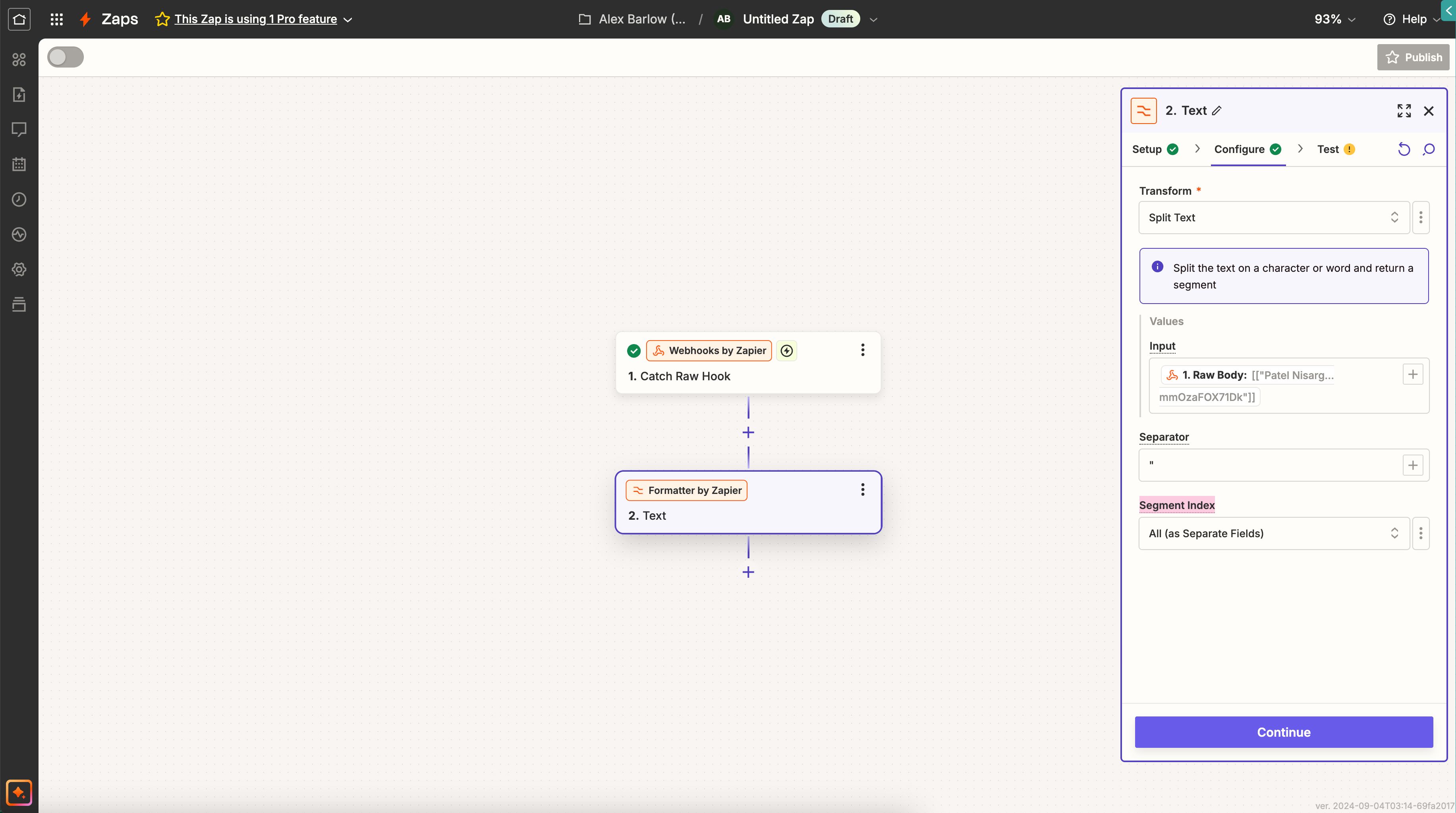
In the Zap, after the Catch raw webhook trigger, add a Formatter by Zapier action with Action event Text, Transform Split text, Input the raw body, Separator a single speech mark and Segment index All (as separate fields), and test the step. Then add a Zapier Tables action with the event Create record and map the Formatter's fields to the table's columns. Turn the Zap on, run the automation again, and the record appears in the table.
How do I run an automation when a Zapier Table changes?
Create a second Zap with a Zapier Tables trigger: a record created, updated or deleted, or a button in the table itself. Add an axiom.ai action with the event Run an Axiom, connect your account, choose the automation by name, and map the table's columns to its input columns. In axiom.ai, give that automation a Receive data from another app first step; the record's columns arrive as [webhook-data], and its Test data, a row in the shape the Zap sends, lets you build and test without the Zap. The shape of such an automation is automate data entry from Zapier.
Why are the Zapier Table record's fields empty or in the wrong order?
The Formatter splits the raw body on speech marks, so each scraped value lands in its own field in the order the automation scraped them. Map them to the table's columns in that order, and test the step after any change to the automation.
Why does the automation not run from the Zapier Table?
The name or the API key does not match. The axiom.ai action matches the automation's name character for character. Check it, and check the API key in the connection. See trigger an automation for the responses the trigger gives.
Can I send scraped data to Zapier Tables without code?
Yes. The scraper is built from the three lines above, with no code, and the Zap's Formatter and Tables actions are set up in Zapier without code either.
Can I run the Zapier Tables scraper on a schedule?
Yes. Save the automation and set a schedule; each run posts the listing's current titles and prices to the Zap, which adds them to the table as new records.
Can I skip Zapier and post scraped data straight to a webhook?
Yes. Any endpoint works as the Trigger webhook target; see trigger a web scraper from a webhook for the round trip without a Zap.
How do I find where a Zapier Tables automation fails?
Check both sides. An automation's failures are in the Builder and the run report: see debug an automation. A Zap's are in its Zap history. When an automation run fails, hand it to the agent and it repairs the step.
Where do I get help?
Get in touch with support, or ask in the axiom.ai community.
Related guides
Trigger a web scraper from Zapier and get the data back
- Take the URL Zapier sends when a row is added
- Open it and scrape the title and price
- Post the title, price and row number to Zapier
Trigger a web scraper from Make and get the data back
- Take the competitor URLs Make sends each morning
- Open each one and scrape the name and price
- Post the whole list of prices to my Make webhook
Trigger a web scraper from n8n and get the data back
- Take the URL someone submitted in my n8n form
- Open it and scrape the title and price
- Post what was scraped to my n8n webhook