Trigger a Slack workflow with a webhook from axiom.ai
How to trigger a Slack workflow with a webhook from axiom.ai: install the Chrome extension, click Build with Browser agent, tell the agent what you want, and follow its prompts. A working bot is built and tested in minutes.
Here is how the automation works. To trigger a Slack workflow from an automation, start the workflow in Slack Workflow Builder with the From a webhook event, then add a Trigger webhook step to your automation with the workflow's web request URL as Endpoint. Data from the run goes in the Payload, and the workflow uses it as variables, for example in a message to a channel.
Build the Slack workflow trigger from a description
Describe it and click the button: the agent builds and tests the automation in your Chrome extension. It asks for the workflow's web request URL, which comes from a workflow you make in Slack Workflow Builder.
- Get today's date
- Create a new Google Sheet named with it
- Send the date and sheet link to my Slack
You need a Slack account with Workflow Builder and a published workflow that starts From a webhook, with two text variables, date and url, that posts them to a channel; making it is in the questions below.
Build the Slack workflow trigger step by step
The steps the agent builds, as the Builder shows them: each step by its name, with the fields to set under it. Add them yourself in this order in the step-by-step builder, or open the agent's result there to adjust it.
- 1.0
Date and timeSelect format: the date format you want in the sheet name
- 2.0
Create a new Google SheetSheet name:[date-and-time]
- 3.0
Trigger webhookEndpoint: the workflow's Web request URLPayload:[date-and-time]as date and[new-google-sheet-url]as url, in the format the workflow shows
Common questions about triggering a Slack workflow
How do I create the Slack workflow that starts from a webhook?
In Slack Workflow Builder, with the From a webhook event:
- In the Slack app, open Workflow Builder and click + New workflow.
- Click Choose an event and select From a webhook.
- Click Set up variables and add two text variables,
dateandurl. The variables are what let the workflow receive data. - Add a Send a message to a channel step from the Messages section, and pick the channel in Select a channel.
- Write the message, using Insert a variable to add
date. - Click + Add button, add a Button label, set Behaviour to Open Link and use the button to insert
url, so the team opens the sheet with a click. - Click Finish up, follow Slack's steps, and click Publish.
- Open the workflow again, click the Starts with a webhook trigger and copy the Web request URL. The same screen shows the payload format the Trigger webhook step follows.
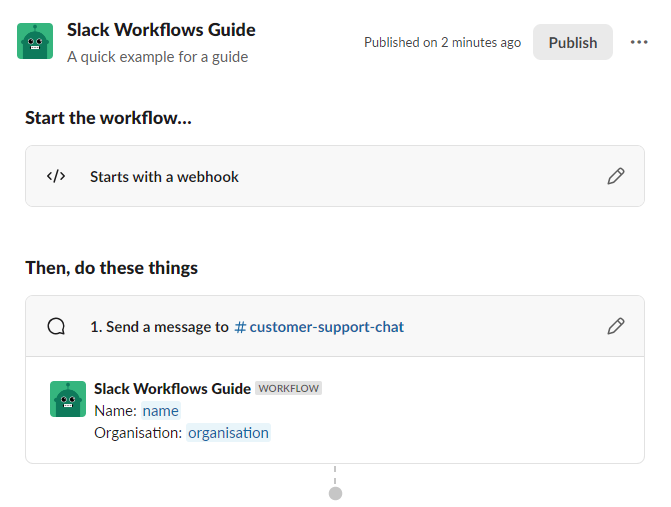
Why does the Slack workflow not run?
Check the workflow is published and Endpoint holds its Web request URL, then read the error the run reports. When a run fails, hand it to the agent and it repairs the step.
How do I send automation run notifications to Slack?
Point the automation's webhook notifications at a Slack workflow. Create the workflow as in the first question, with two text variables, status and log, then in the automation:
- Open Settings and the Set up notifications section.
- Toggle the runs you want to hear about: when a run fails, finishes with warnings, or succeeds.
- Turn on Notify by webhook and paste the workflow's Web request URL.
See run notifications for every option.
How do I add more detail to the failure log sent to Slack?
Add an Add error metadata step before the step that may fail. Its metadata appears in the log sent when the automation fails. For more on debugging, see how to debug.
Can I send scraped data to a Slack workflow?
Yes. Add Trigger webhook after the scraping step and insert the scraped data into Payload, in the format the workflow shows. Use it for custom data even when run notifications are on; the two work together. Slack limits how often its API can be called: see Slack's rate limits.
Can I post the Google Sheet to Slack every day on a schedule?
Yes. Open Settings, then Schedule, and set the time, if your plan includes scheduling. Each run creates that day's sheet and posts its link.
Can I trigger a Slack workflow from axiom.ai without code?
Yes. The workflow's webhook takes a plain POST, and the Trigger webhook step sends it with the run's data in Payload; there is no script and no Slack app to build.
Where do I get help?
Get in touch with support, or ask in the axiom.ai community.
Related guides
Trigger a desktop run from Make and post the data back
- Go to the page I give you
- Scrape the values I want from it
- Post what was scraped to my Make webhook
Trigger a web scraper from a webhook
- Take a list of product URLs sent to me by webhook
- Open each one and scrape the title and price
- Post everything scraped to my results webhook
Trigger an axiom.ai automation from Power Automate
- Start when my Power Automate flow sends data
- Add the rows it sends to my Google Sheet
- Then call my Power Automate flow's webhook
Custom error reports by email or webhook, with the failed row
- Read the product URLs from my Google Sheet
- Before each one, note which row it is
- Visit each URL and scrape the product page
- Write the data to my Results tab