Trigger an axiom.ai automation from Power Automate
How to trigger an axiom.ai automation from Power Automate: install the Chrome extension, click Build with Browser agent, tell the agent what you want, and follow its prompts. A working bot is built and tested in minutes.
Here is how the automation works. To trigger an axiom.ai automation from Power Automate, add an Invoke web service action (desktop app) or an HTTP action (web) that posts your API key, the automation's name and any data to https://lar.axiom.ai/api/v3/trigger. The other way round, a Trigger webhook step in the automation starts a Power Automate flow on the web.
Build the Power Automate trigger from a description
Describe it and click the button: the agent builds and tests the axiom.ai side in your Chrome extension. You need your API key from the Dashboard; see API keys.
- Start when my Power Automate flow sends data
- Add the rows it sends to my Google Sheet
- Then call my Power Automate flow's webhook
Triggering needs a plan that supports webhooks (pricing), and Power Automate from the Microsoft Store for the desktop app or a paid subscription for Power Automate on the web; only the web version can be started by a webhook. Note the automation's name exactly as saved, since the flow's request names it.
Build the Power Automate trigger step by step
The steps the agent builds, as the Builder shows them: each step by its name, with the fields to set under it. Add them yourself in this order in the step-by-step builder, or open the agent's result there to adjust it.
- 1.0
Receive data from another appTest data: a few rows in the shape the flow sends, while you build
- 2.0
Write data to a Google SheetSpreadsheet: your sheetDATA:[webhook-data]Write options: Add to existing data
- 3.0
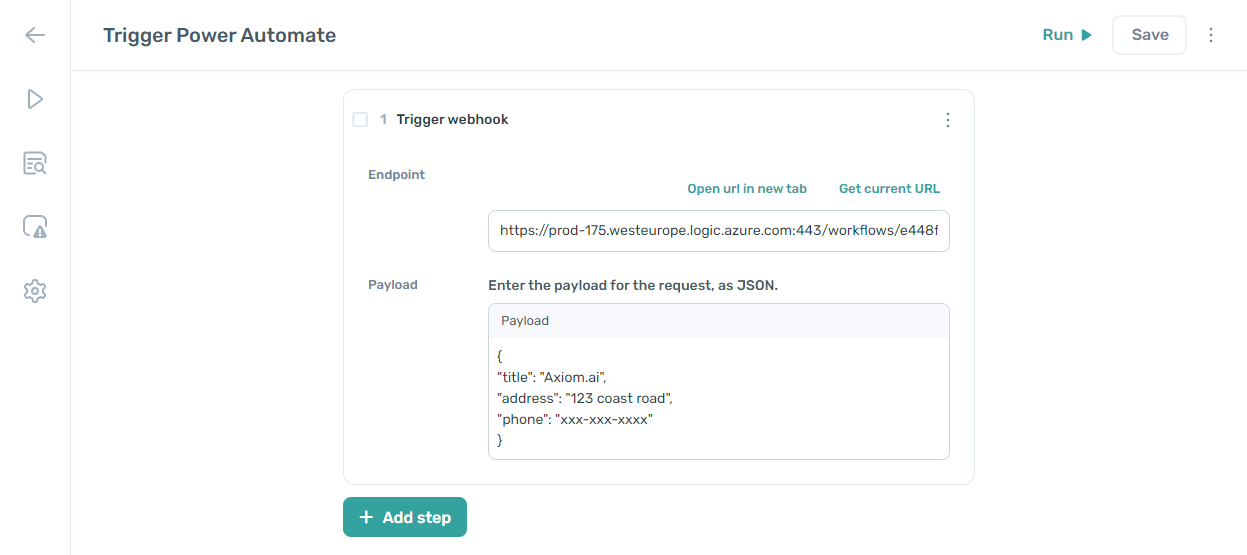
Trigger webhookEndpoint: the flow's When a HTTP request is received URLPayload: the data the flow's request body schema expects
Common questions about triggering automations from Power Automate
Why did the automation not run when Power Automate triggered it?
The automation failed to start. When it is not in the run reports either, review the Power Automate flow for the error messages it raised, and check the key and automation name in the request body. When a run fails, hand it to the agent and it repairs the step.
How do I trigger the automation from the Power Automate desktop app?
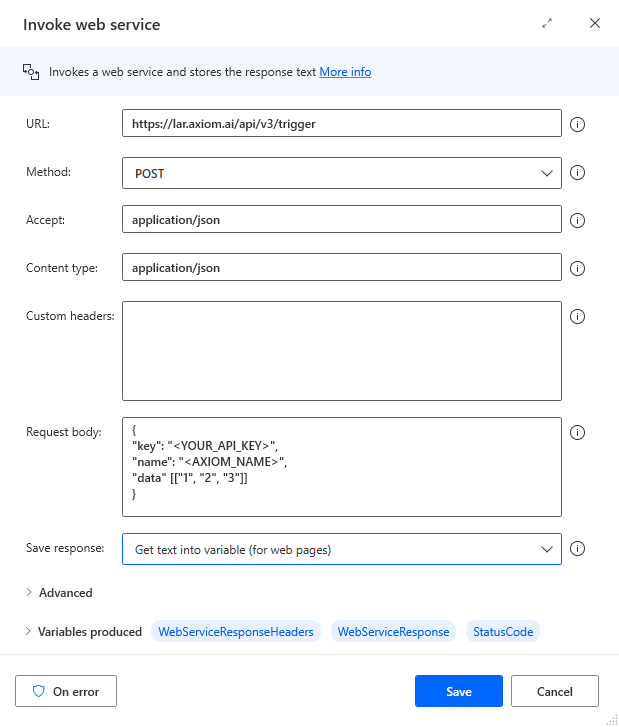
With an Invoke web service action. Set URL to https://lar.axiom.ai/api/v3/trigger, Method to POST, Accept and Content type to application/json, turn off Encode request body, and set Request body to the JSON below with your own key, automation name and data. See triggering an automation for the full request body.
{
  "key": "your-api-key-here",
  "name": "My automation",
  "data": [["Item 1", "Item 2"]]
}
How do I trigger the automation from Power Automate on the web?
With an HTTP action in an instant or scheduled cloud flow. Set URL to https://lar.axiom.ai/api/v3/trigger, Method to POST, Headers to Content-Type: application/json, and Request body to the same JSON as the desktop app, with your own key, automation name and data.
How do I start a Power Automate flow from the automation?
With a cloud flow on the web whose trigger is When a HTTP request is received, set so Anyone can trigger it, and a Request Body JSON Schema if you want one. Saving the flow generates its unique webhook URL; paste it into Endpoint on the automation's Trigger webhook step and send the data the schema expects in Payload.
Can the Power Automate desktop app be triggered by axiom.ai?
No. The desktop app does not support triggers by webhook. To start a flow from an automation, build the flow in Power Automate on the web.
Do I need a paid plan to trigger axiom.ai from Power Automate?
Yes, on the axiom.ai side: triggering needs a plan that supports webhooks. See pricing. Power Automate on the web also needs a paid Power Automate subscription.
Who can trigger the Power Automate flow from a webhook?
Anyone, once When a HTTP request is received is set to Anyone, which is what lets the axiom.ai automation call it. Consider your organisation's security needs before you turn it on.
How do I check that the Power Automate trigger worked?
Run the flow in Power Automate, then open the axiom.ai extension: the automation may already be running, and once it has finished its run report is in the run reports section of the Dashboard. The Google Sheet holds the rows the flow sent.
Can I trigger an axiom.ai automation from other apps the same way?
Yes. The same request works from any app that can send a POST: see trigger an automation from Apple Automator, trigger an automation from Google Apps Script and trigger a web scraper from a webhook.
Where do I get help?
Get in touch with support, or ask in the axiom.ai community.
Related guides
Trigger a desktop run from Make and post the data back
- Go to the page I give you
- Scrape the values I want from it
- Post what was scraped to my Make webhook
Post scraped data to Make with a webhook
- Go to the listing page I give you
- Scrape the title and price of every item
- Post what was scraped to my Make webhook
Connect IFTTT and axiom.ai with webhooks
- Take the company name, address and phone
- Send them to my IFTTT applet's webhook
- One field each, so IFTTT can use them
How to automate Tadabase with axiom.ai
CodeLearn how to automatically send data to your Tadabase databases and trigger your axiom.ai automations using triggers.